快速入门 message定义一个消息 订单的消息格式:每个订单都含有一个order_id,订单金额num,订单时间timestamp字段。
1 2 3 4 5 6 7 8 9 10 11 12 13 14 15 syntax = "proto2" package myexample; message Order required string order_id = 1 ; optional int64 num = 2 ; repeated int32 timestamp = 3 ; } message Person required string Name = 1 ; required int32 Age = 2 ; required string From = 3 ; }
指定字段类型:protobuf字段的类型包括:string,int32,int64,enum等等
分配标识符:每个字段都有一个标识符,从1到536870911
指定字段规则:字段的修饰符包含三种类型:
required:该字段必须设置
optional:该字段是可选的,即改字段可以有0个或1个值(不超过1)
repeated:该字段可以重复任意次(包括0次)
编译proto文件 编译person.proto文件,并将已编译文件输出到当前目录。执行:
1 protoc --go_out=. person.proto
这样,当前目录就新增了一个person.pb.go文件,此文件包含了person的序列化和反序列化方法,可以给后续go文件使用。
在go文件中使用 1 2 3 4 5 6 7 8 9 10 11 12 13 14 15 16 17 18 19 20 21 22 23 24 25 26 27 28 29 30 31 package mainimport ( "fmt" "ProtocDemo/myexample" "github.com/golang/protobuf/proto" "os" ) func main () msg_test := &myexample.Person{ Name: proto.String("hyl" ) Age : proto.Int(22 ) From: proto.String("China" ) } msgDataEncoding, err := proto.Marshal(msg_test) if err != nil { panic (err.Error()) return } msgEntity := myexample.Person{} err = proto.Unmashal(msgDataEncoding, &msgEntity) if err != nil { fmt.Println(err.Error()) os.Exit(1 ) return } }
详细教程 首先让我们看一个简单的例子simple.proto:
1 2 3 4 5 6 7 syntax = "proto3" ; message SearchRequest string query = 1 ; int32 page_number = 2 ; int32 result_per_page = 3 ; }
第一行指定protobuf的版本,这里是以proto3格式定义。你还可以指定为proto2。如果没有指定,默认以proto2格式定义。
它定义了一个message类型: SearchRequest, 它包含三个字段query、page_number、result_per_page,它会被protoc编译成不同的编程语言的相应对象,比如Java中的class、Go中的struct等。
字段是以[ "repeated" ] type fieldName "=" fieldNumber [ "[" fieldOptions "]" ] ";"格式定义的。这个例子是一个简单的例子,采用了type fieldName "=" fieldNumber格式定义的。
比如第一个字段query, 首先是它的类型string,其次是字段的名称,然后是等号=, 之后是字段的序号,然后是分号。
复杂的结构,前面可以定义为repeated, 序号之后可以定义一些可选项。
这是普通的字段定义,当然还有一些复杂的一些字段定义,比如Oneof、Map、Reserved、enum定义,下一节我们再详细讲。
在当前的目录下执行protoc -I=. -I/usr/local/include -I=$(GOPATH)/src --go_out=. simple.proto, 可以将这个proto编译成Go的代码,因为这里我们使用了go_out输出格式。
-I指定protoc的搜索import的proto的文件夹。在MacOS操作系统中protobuf把一些扩展的proto放在了/usr/local/include对应的文件夹中,一些第三方的Go库放在了gopath对应的包下,所以这里都把它们加上了。对于这个简单的例子,实际是不需要的。
cpp_out用来生成C++代码,java_out产生Java代码,python_out产生python代码,类似地还有csharp_out、objc_out、ruby_out、php_out等参数。
一些第三方的插件也会定义自己的输出插件,比如gofast_out使用gogo库生成代码, rust_out产生rust代码。
生成的代码我们指定放在本地文件夹中(--go_out=.)。
生成的数据结构如下,它还包括一些辅助方法以及GetXXXX读取字段的方法。
1 2 3 4 5 6 7 8 9 10 11 12 13 14 15 16 17 18 19 type SearchRequest struct { Query string `protobuf:"bytes,1,opt,name=query,proto3" json:"query,omitempty"` PageNumber int32 `protobuf:"varint,2,opt,name=page_number,json=pageNumber,proto3" json:"page_number,omitempty"` ResultPerPage int32 `protobuf:"varint,3,opt,name=result_per_page,json=resultPerPage,proto3" json:"result_per_page,omitempty"` XXX_NoUnkeyedLiteral struct {} `json:"-"` XXX_unrecognized []byte `json:"-"` XXX_sizecache int32 `json:"-"` } func (m *SearchRequest) Reset () func (m *SearchRequest) String () string return proto.CompactTextString(m) }func (*SearchRequest) ProtoMessage () func (*SearchRequest) Descriptor () ([]byte , []int ) return fileDescriptor_5ffd045dd4d042c1, []int {0 } } func init () proto.RegisterType((*SearchRequest)(nil ), "abc.SearchRequest" ) } ......
proto3 格式 版本定义 首先我们会定义proto的版本。
引入其它proto文件 1 2 3 import "other.proto"; import public "other2.proto"; import weak "other.proto";
比较少使用的是public和weak关键字。默认情况下weak引入的文件允许不存在(missing),只为了google内部使用。public具有传递性,如果你在文件中通过public引入第三方的proto文件,那么引入你这个文件同时也会引入第三方的proto。
我们一般忽略public和weak关键字,这两个关键字也没有在规范中详细进行介绍。
package 定义proto的包名,包名可以避免对message 类型之间的名字冲突,同名的Message可以通过package进行区分。
在没有为特定语言定义option xxx_package的时候,它还可以用来生成特定语言的包名,比如Java package, go package。
option option可以用在proto的scope中,或者message、enum、service的定义中。
option的定义格式是"option" optionName "=" constant ";",比如:
1 option java_package = "com.example.foo";
一些Protobuf定义的option:
java_package
java_multiple_files
java_outer_classname
optimize_for
cc_enable_arenas
objc_class_prefix
deprecated
自定义的例子:
1 2 3 4 5 6 7 8 9 10 option (gogoproto.testgen_all) = true; option (gogoproto.populate_all) = true; option (gogoproto.benchgen_all) = true; message NidRepPackedNative { repeated double Field1 = 1 [(gogoproto.nullable) = false, packed = true]; repeated float Field2 = 2 [(gogoproto.nullable) = false, packed = true]; repeated int32 Field3 = 3 [(gogoproto.nullable) = false, packed = true]; }
普通字段 前面讲过,普通字段的格式为field = [ "repeated" ] type fieldName "=" fieldNumber [ "[" fieldOptions "]" ] ";"
repeated允许字段重复,对于Go语言来说,它会编译成数组(slice of type)类型的格式。
其中类型可以是以下几种类型:
数字类型: double、float、int32、int64、uint32、uint64、sint32、sint64: 存储长度可变的浮点数、整数、无符号整数和有符号整数
存储固定大小的数字类型:fixed32、fixed64、sfixed32、sfixed64: 存储空间固定
布尔类型: bool
字符串: string
bytes: 字节数组
messageType: 消息类型
enumType:枚举类型
字段名、消息名、枚举类型名、map名、服务名等名称首字母必须是字母类型,然后可以是字母、数字或者下划线_。
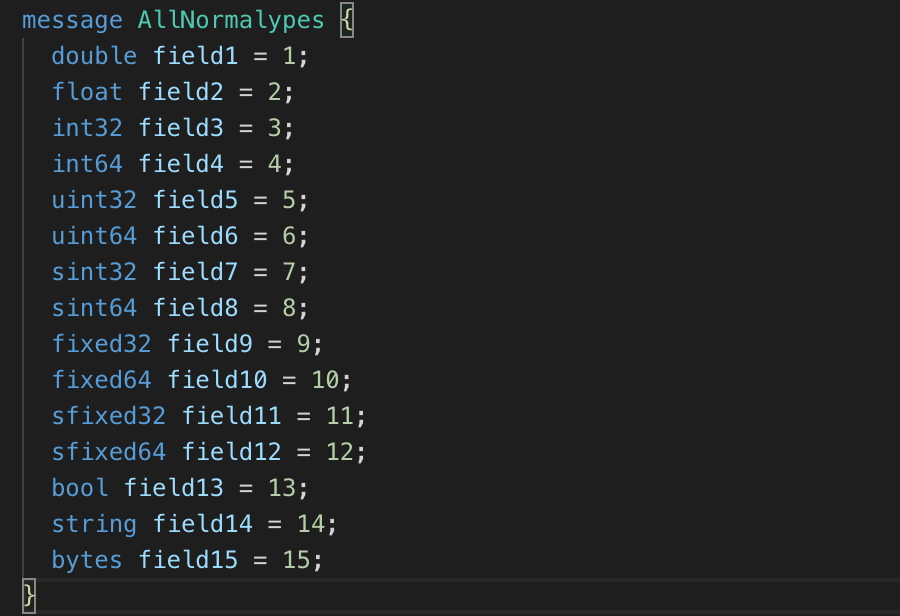
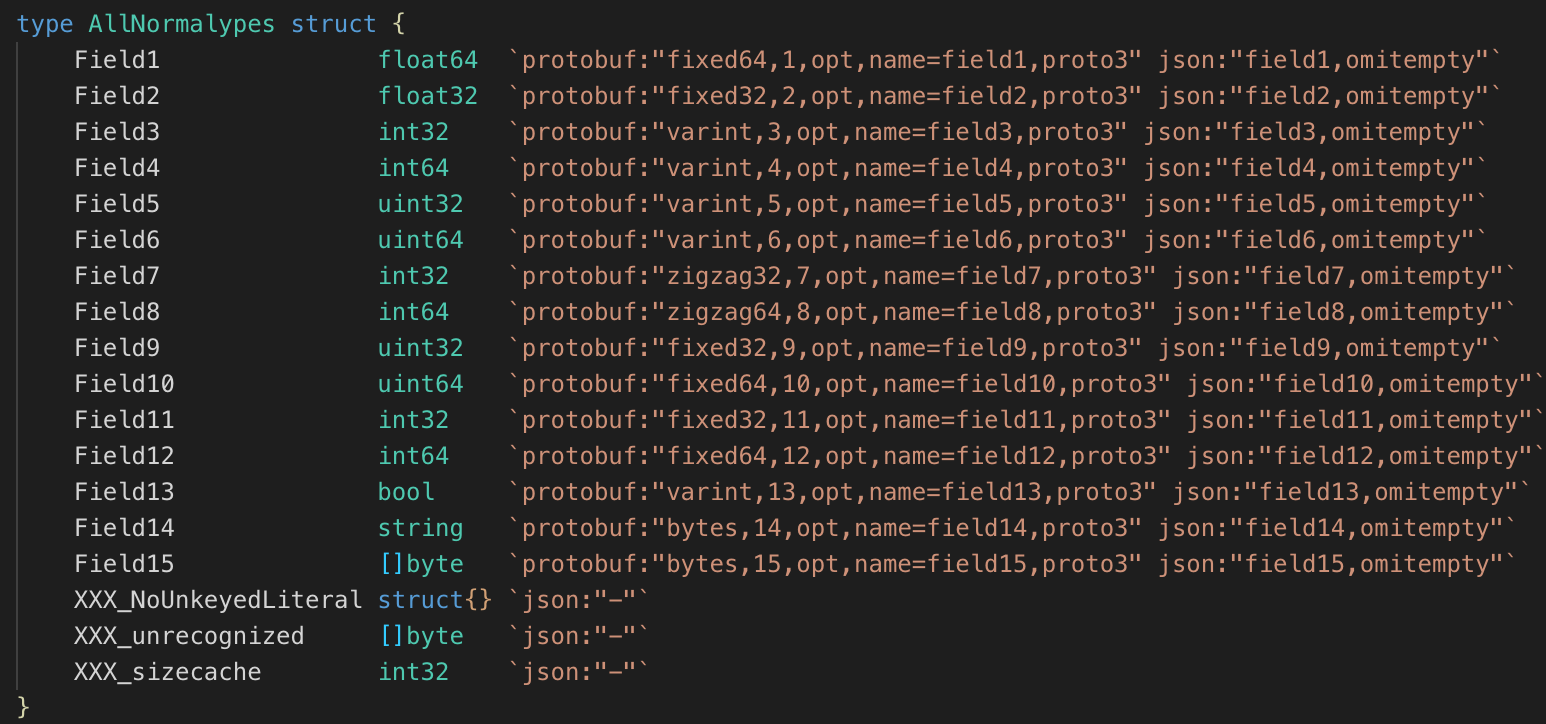
下面是一个包含各种类型(Scalar Value Types)的proto文件。
编译成Go文件:protoc -I=. -I/usr/local/include -I=$(GOPATH)/src --go_out=. types.proto。
proto类型和各语言的对应关系可以参考文档:Scalar Value Types
同一个message的每个字段都有唯一一个编号,并且建议终生这个编号都不要改变。
Oneof 如果你有一组字段,同时最多允许这一组中的一个字段出现,就可以使用Oneof定义这一组字段,这有点Union的意思,但是Oneof允许你设置零各值。
因为proto3没有办法区分正常的值是否是设置了还是取得缺省值(比如int64类型字段,如果它的值是0,你无法判断数据是否包含这个字段,因为0几可能是数据中设置的值,也可能是这个字段的零值),所以你可以通过Oneof取得这个功能,因为Oneof有判断字段是否设置的功能。
1 2 3 4 5 6 7 8 9 10 syntax = "proto3"; package abc; message OneofMessage { oneof test_oneof { string name = 4; int64 value = 9; } }
oneof字段不能同时使用repeated。
map类型 map类型需要设置键和值的类型,格式是"map" "<" keyType "," type ">" mapName "=" fieldNumber [ "[" fieldOptions "]"。
比如:
1 map<int64,string> values = 1;
map字段不能同时使用repeated。
Reserved Reserved可以用来指明此message不使用某些字段,也就是忽略这些字段。
可以通过字段编号范围或者字段名称指定保留的字段:
1 2 3 4 5 6 7 8 9 10 11 12 13 14 15 16 17 18 19 20 21 22 23 syntax = "proto3"; package abc; message AllNormalypes { reserved 2, 4 to 6; reserved "field14", "field11"; double field1 = 1; // float field2 = 2; int32 field3 = 3; // int64 field4 = 4; // uint32 field5 = 5; // uint64 field6 = 6; sint32 field7 = 7; sint64 field8 = 8; fixed32 field9 = 9; fixed64 field10 = 10; // sfixed32 field11 = 11; sfixed64 field12 = 12; bool field13 = 13; // string field14 = 14; bytes field15 = 15; }
声明保留的字段你就不要再定义了,否则编译的时候会出错。
枚举类型 枚举类型也是常用的一种类型,它限定字段的值只能取某个特定的值,比如星期类型只能取周一到周日七个值。
注意枚举类型的定义采用C++ scoping规则,也就是枚举值是枚举类型的兄弟类型,而不是子类型,所以避免在同一个package定义重名的枚举字段。
1 2 3 4 5 6 7 8 9 10 11 enum EnumAllowingAlias { option allow_alias = true; UNKNOWN = 0; STARTED = 1; RUNNING = 1; } enum EnumNotAllowingAlias { UNKNOWN2 = 0; STARTED2 = 1; // RUNNING = 1; }
虽然产生的Go代码会给产生的类型加上前缀,但是proto的定义还是需要避免重名(把上面的STARTED2改成STARTED试试)。
如果设置allow_alias,允许字段编号重复,RUNNING是STARTED的别名。
枚举的常量必须是一个32比特的整数,从效率的角度考虑,不推荐采用负数。
第一个枚举值必须是0,而且必须定义。
你也可以把枚举类型定义到message中:
1 2 3 4 5 6 7 8 9 10 11 12 13 14 15 message SearchRequest { string query = 1; int32 page_number = 2; int32 result_per_page = 3; enum Corpus { UNIVERSAL = 0; WEB = 1; IMAGES = 2; LOCAL = 3; NEWS = 4; PRODUCTS = 5; VIDEO = 6; } Corpus corpus = 4; }
对于无法识别的枚举值,不同的语言有不同的处理。对于Go语言来说,因为枚举类型以int32来表示,所以对应的值依然用int32解析出来,只不过没有对应的枚举值而已。这种情况还是会存在的,比如proto有改动,或者代码强行设置了一个未知的枚举值。
使用其它类型 你也可以使用其它message类型作为字段的类型值。因为前面在介绍字段的类型的时候说了,类型可以是消息类型和枚举类型,枚举类型如上所示,而消息类型如下所示:
1 2 3 4 5 6 7 8 9 message SearchResponse { repeated Result results = 1; } message Result { string url = 1; string title = 2; repeated string snippets = 3; }
如果要使用的类型在其它proto文件中定义,你需要使用import把对应的文件引入进来。
嵌套类型 嵌套类型就是消息类型里面定义了消息类型:
1 2 3 4 5 6 7 8 message SearchResponse { message Result { string url = 1; string title = 2; repeated string snippets = 3; } repeated Result results = 1; }
如果Result不需要共用,只被SearchResponse使用,可以采用这种定义方式, 如果你需要在外部使用这个类型,其实你也可以使用,但是不如把这个内部的消息类型定义抽取出来,除非你有很特别的含义:
1 2 3 message SomeOtherMessage { SearchResponse.Result result = 1; }
未知类型 未知类型是指数据的格式符合Protobuf的定义,但是数据中的某个/某些字段解析器无法识别的字段类型。一般发生在proto文件有变化,新旧数据不一致的情况导致。
proto3最开始对于不能识别的数据就丢弃掉了,但是自3.5 版本后重新引入了未知字段,以匹配proto2的行为。
Any Any字段允许你处理嵌套数据,并不需要它的proto定义。一个Any以bytes呈现序列化的消息,并且包含一个URL作为这个类型的唯一标识和元数据。
为了使用Any类型,你需要引入google/protobuf/any.proto。
1 2 3 4 5 6 import "google/protobuf/any.proto"; message ErrorStatus { string message = 1; repeated google.protobuf.Any details = 2; }
Any类型用来替换proto2中的扩展。
更新消息类型 有时候你不得不修改正在使用的proto文件,比如为类型增加一个字段,protobuf支持这种修改而不影响已有的服务,不过你需要遵循一定的规则:
不要改变已有字段的字段编号
当你增加一个新的字段的时候,老系统序列化后的数据依然可以被你的新的格式所解析,只不过你需要处理新加字段的缺省值。 老系统也能解析你信息的值,新加字段只不过被丢弃了
字段也可以被移除,但是建议你Reserved这个字段,避免将来会使用这个字段
int32, uint32, int64, uint64 和 bool类型都是兼容的
sint32 和 sint64兼容,但是不和其它整数类型兼容
string 和 bytes兼容,如果 bytes 是合法的UTF-8 bytes的话
嵌入类型和bytes兼容,如果bytes包含一个消息的编码版本的话
fixed32和sfixed32, fixed64和sfixed64
enum和int32, uint32, int64, uint64格式兼容
把单一一个值改变成一个新的oneof类型的一个成员是安全和二进制兼容的。把一组字段变成一个新的oneof字段也是安全的,如果你确保这一组字段最多只会设置一个。把一个字段移动到一个已存在的oneof字段是不安全的
其它 如果没有Any类型,序列化后的数据是没有类型的元数据信息的。这也意味着序列化的包和序列化后的包可以不一样,只要保证数据格式的定义兼容即可。
还可以通过Protobuf定义grpc服务,不过这个教程不涉及这一方面的介绍。
Well-Known类型 除了我们前面介绍的基本类型、Any、还有省略未介绍的Service相关的类型外,还有一些大家常见的类型,Protobuf也提供了定义,比如Timestamp和Duration。这里我们看看如何使用它。
Protobuf提供了github.com/golang/protobuf/ptypes/timestamp.Timestamp和github.com/golang/protobuf/ptypes/duration.Duration两种扩展类型,用来表示时间,并提供了和标准库time.Time和 time.Duration的转换函数。
你可以在你的proto中需要时间戳和duration的地方使用这两个类型,而不是使用标准库的time.Time和time.Duration,因为标注库的类型没有提供protobuf序列化反序列化的功能,你需要额外处理,所以不如直接使用Protobuf提供的对应类型(下一节gogo库提供了对标准库的支持,稍候再讲)。
同时,它还是以指针的方式定义字段,这也意味着我们我们可以分别反序列化的时候,可以区分对应字段是否在数据中存在。
1 2 3 4 5 6 7 8 9 10 11 12 13 14 15 16 17 18 19 20 21 22 23 24 25 26 27 package main import ( fmt "fmt" "time" proto "github.com/golang/protobuf/proto" ptypes "github.com/golang/protobuf/ptypes" ) func main() { msg := &WellKnownTypes{ Now: ptypes.TimestampNow(), Took: ptypes.DurationProto(10 * time.Minute), } data, err := proto.Marshal(msg) if err != nil { panic(err) } err = proto.Unmarshal(data, msg) if err != nil { panic(err) } fmt.Println(msg) }
编码 首先,我们先了解varint方法。varint方法是一种使用变长方式表示整数的方法,可以使用一个或者多个字节来表示小整数和大整数,数越小,使用的字节数越少。
在varint表示的字节中,除了最后一个字节,前面的字节都有一个bit来表示还有字节需要处理,这个标记叫做most significant bit (msb) set。低位放在前面。
比如1表示为0000 0001。最高位0表示这是最后一个字节了,只用一个字节就可以表示。
数字300表示为1010 1100 0000 0010, 两个字节来表示。每个字节高位去掉即可: 010 1100 000 0010,反转000 0010 010 1100,去掉前面的0,也就是100101100, 2^8 + 2^5 + 2^3 + 2^2= 256+32+8+4=300。
Go标准库encoding/binary有对varint处理方法 。
事实上。Protobuf是编码的键值对,其中键用varint来表示,其中后三位代表wire type。
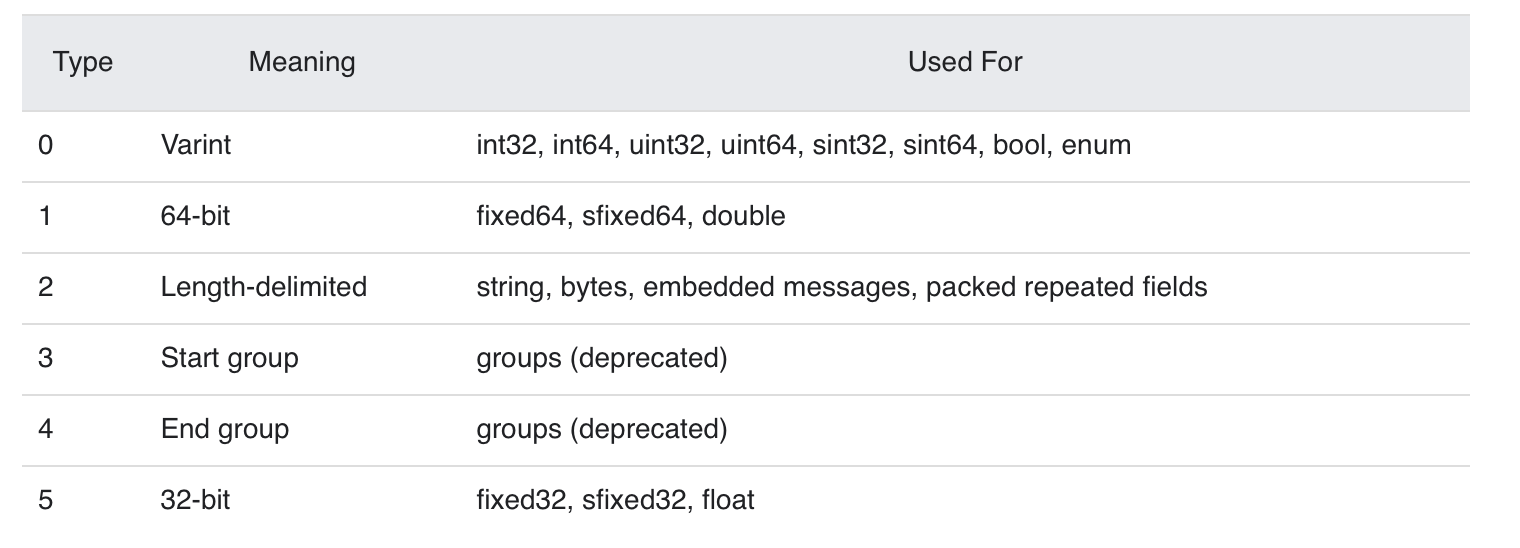
Protobuf只定义了6种wire类型。
对于字段比较少(2^4=16)情况,使用一个字节就可以表示key。
我们以一个简单的例子,看看Protobuf是如何进行编码的。
这个例子的proto定义文件为:
1 2 3 4 5 6 7 8 9 syntax = "proto3"; option go_package = "main"; message Person { string name = 1; int32 id = 2; repeated string email = 3; }
它定义了Persion这个message,包含三个字段,分别是string, int32和string类型,其中第三个字段允许重复。
定义一个实例:
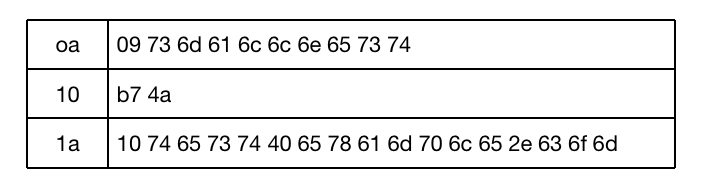
1 2 3 4 5 p := &Person{ Name: "smallnest", Id: 9527, Email: []string{"test@example.com"}, }
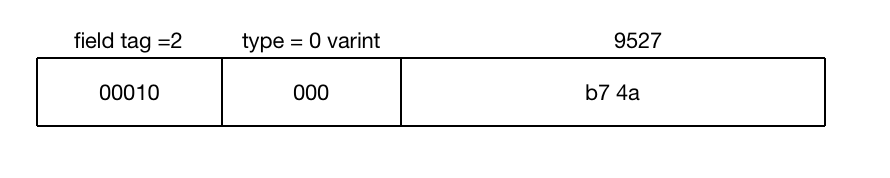
编码后是一个32字节的数据:
第一个字段的类型是字符串(wire type是2), 字段编号是1 (00000001), 字段编号左移三位再加上wiretype就是0a(00001010)。
第二个字段的类型是int32(wire type是0), 字段编号是2 (00000010), 字段编号左移三位再加上wiretype就是10(00010000)。
第三个字段的类型是字符串(wire type是2), 字段编号是3 (00000011), 字段编号左移三位再加上wiretype就是1a(00011010)。
为了更有效的处理sint32和sint64, Protobuf采用ZigZag编码 。
对于固定长度的数字,采用小端序的方式编码(little-endian byte order)。
字符串处理key之外,还需要一个varint记录其长度,然后是UTF-8的字符串值。
嵌入的message和bytes、string一样。
Proto3中对数字类型的repeated字段采用pack处理方式,同一个repeated元素共享同一个key,之后是字段的整体字节长度,然后是各个元素。因为数字类型天生具有可区分性,不需要额外的分隔符进行区分。
gogo库 虽然官方库golang/protobu 提供了对Protobuf的支持,但是使用最多还是第三方实现的库gogo/protobuf 。
gogo库基于官方库开发,增加了很多的功能,包括:
快速的序列化和反序列化
更规范的Go数据结构
goprotobuf兼容
可选择的产生一些辅助方法,减少使用中的代码输入
可以选择产生测试代码和benchmark代码
其它序列化格式
比如etcd、k8s、dgraph、docker swarmkit都使用它。
基于速度和定制化的考虑,gogo有三种产生代码的方式
gofast: 速度优先,不支持其它gogoprotobuf extensions。
1 2 go get github.com/gogo/protobuf/protoc-gen-gofast protoc --gofast_out=. myproto.proto
gogofast、gogofaster、gogoslick: 更快的速度、更多的产生代码
gogofast类似gofast,但是会导入gogoprotobuf.gogofaster类似gogofast, 不会产生XXX_unrecognized指针字段,可以减少垃圾回收时间。gogoslick类似gogofaster,但是可以增加一些额外的方法gostring和equal等等。
1 2 3 4 5 go get github.com/gogo/protobuf/proto go get github.com/gogo/protobuf/{binary} //protoc-gen-gogofast、protoc-gen-gogofaster 、protoc-gen-gogoslick go get github.com/gogo/protobuf/gogoproto protoc -I=. -I=$GOPATH/src -I=$GOPATH/src/github.com/gogo/protobuf/protobuf --{binary}_out=. myproto.proto
protoc-gen-gogo: 最快的速度,最多的可定制化
你可以通过扩展定制序列化: 扩展 .
1 2 3 4 go get github.com/gogo/protobuf/proto go get github.com/gogo/protobuf/jsonpb go get github.com/gogo/protobuf/protoc-gen-gogo go get github.com/gogo/protobuf/gogoproto
gogo同样支持grpc: protoc --gofast_out=plugins=grpc:. my.proto, 但是本文不涉及这方面的介绍。
gogo提供了非常多的option, 以便在产生代码的时候进行更多的控制。这里有一个全面的介绍:extensions ,主要包含一些生成快速序列化反序列化的代码的可选项、生成更规范的Go数据结构的可选项、Goprotobuf兼容的可选项,一些产生辅助方法的可选项、产生测试代码和benchmark的可选项,还可以增加jsontag。
这些可选项既然可以在message、enum中定义,控制单个message的生成方式,也可以在proto file scope中定义,控制这个文件中所有的message和enum的生成方式。如果是文件中定义可选项,可选项后面加_all下划线, 例如:
marshaler_all
sizer_all
protosizer_all
unmarshaler_all
unsafe_marshaler_all
unsafe_unmarshaler_all
stable_marshaler_all
goproto_enum_prefix_all
goproto_getters_all
goproto_stringer_all
goproto_enum_stringer_all
……
经常有网友问,标准库中的time.Time增加进行protobuf序列化?有建议采用unixtime, 使用int64表示。但是如果你使用gogo库,问题迎刃而解,因为它可以为标准库的time.Time和time.Duration生成定制的序列化反序列化方法。你直接使用标准库的类型即可。
下面是一个比较全面的扩展类型的proto的定义,增加了很多gogo的特别控制。运行protoc -I=. -I=$(GOPATH)/src --gogo_out=. example.proto会产生对应的代码以及测试和benchmark代码,你可以运行测试一下,以便更好的了解gogo库的威力。
1 2 3 4 5 6 7 8 9 10 11 12 13 14 15 16 17 18 19 20 21 22 23 24 25 26 27 28 29 30 31 32 33 34 35 36 37 38 39 40 41 42 43 44 45 46 47 48 49 50 51 52 53 54 55 56 57 58 59 60 61 62 63 64 65 66 67 68 69 70 71 72 73 74 75 76 77 78 79 80 81 82 83 84 85 86 87 88 89 90 91 92 93 94 95 syntax = "proto3"; package gogo_p3; import "github.com/gogo/protobuf/gogoproto/gogo.proto"; //import "google/protobuf/any.proto"; import "google/protobuf/duration.proto"; import "google/protobuf/struct.proto"; import "google/protobuf/timestamp.proto"; import "google/protobuf/wrappers.proto"; option (gogoproto.testgen_all) = true; option (gogoproto.populate_all) = true; option (gogoproto.benchgen_all) = true; option (gogoproto.unmarshaler_all) = false; option (gogoproto.marshaler_all) = false; option (gogoproto.sizer_all) = true; option (gogoproto.equal_all) = true; option (gogoproto.verbose_equal_all) = true; option (gogoproto.unsafe_marshaler_all) = false; option (gogoproto.unsafe_unmarshaler_all) = false; message KnownTypes { option (gogoproto.compare) = true; google.protobuf.Duration dur = 1; google.protobuf.Timestamp ts = 2; google.protobuf.DoubleValue dbl = 3; google.protobuf.FloatValue flt = 4; google.protobuf.Int64Value i64 = 5; google.protobuf.UInt64Value u64 = 6; google.protobuf.Int32Value i32 = 7; google.protobuf.UInt32Value u32 = 8; google.protobuf.BoolValue bool = 9; google.protobuf.StringValue str = 10; google.protobuf.BytesValue bytes = 11; // TODO uncomment this once https://github.com/gogo/protobuf/issues/197 is fixed google.protobuf.Struct st = 12; // google.protobuf.Any an = 14; } message ProtoTypes { // TODO this should be a compare_all at the top of the file once time.Time, time.Duration, oneof and map is supported by compare option (gogoproto.compare) = true; google.protobuf.Timestamp nullableTimestamp = 1; google.protobuf.Duration nullableDuration = 2; google.protobuf.DoubleValue nullableDouble = 3; google.protobuf.FloatValue nullableFloat = 4; google.protobuf.Int64Value nullableInt64 = 5; google.protobuf.UInt64Value nullableUInt64 = 6; google.protobuf.Int32Value nullableInt32 = 7; google.protobuf.UInt32Value nullableUInt32 = 8; google.protobuf.BoolValue nullableBool = 9; google.protobuf.StringValue nullableString = 10; google.protobuf.BytesValue nullableBytes = 11; google.protobuf.Timestamp timestamp = 12 [(gogoproto.nullable) = false]; google.protobuf.Duration duration = 13 [(gogoproto.nullable) = false]; google.protobuf.DoubleValue nonnullDouble = 14 [(gogoproto.nullable) = false]; google.protobuf.FloatValue nonnullFloat = 15 [(gogoproto.nullable) = false]; google.protobuf.Int64Value nonnullInt64 = 16 [(gogoproto.nullable) = false]; google.protobuf.UInt64Value nonnullUInt64 = 17 [(gogoproto.nullable) = false]; google.protobuf.Int32Value nonnullInt32 = 18 [(gogoproto.nullable) = false]; google.protobuf.UInt32Value nonnullUInt32 = 19 [(gogoproto.nullable) = false]; google.protobuf.BoolValue nonnullBool = 20 [(gogoproto.nullable) = false]; google.protobuf.StringValue nonnullString = 21 [(gogoproto.nullable) = false]; google.protobuf.BytesValue nonnullBytes = 22 [(gogoproto.nullable) = false]; } message StdTypes { google.protobuf.Timestamp nullableTimestamp = 1 [(gogoproto.stdtime) = true]; google.protobuf.Duration nullableDuration = 2 [(gogoproto.stdduration) = true]; google.protobuf.DoubleValue nullableDouble = 3 [(gogoproto.wktpointer) = true];; google.protobuf.FloatValue nullableFloat = 4 [(gogoproto.wktpointer) = true];; google.protobuf.Int64Value nullableInt64 = 5 [(gogoproto.wktpointer) = true];; google.protobuf.UInt64Value nullableUInt64 = 6 [(gogoproto.wktpointer) = true];; google.protobuf.Int32Value nullableInt32 = 7 [(gogoproto.wktpointer) = true];; google.protobuf.UInt32Value nullableUInt32 = 8 [(gogoproto.wktpointer) = true];; google.protobuf.BoolValue nullableBool = 9 [(gogoproto.wktpointer) = true];; google.protobuf.StringValue nullableString = 10 [(gogoproto.wktpointer) = true];; google.protobuf.BytesValue nullableBytes = 11 [(gogoproto.wktpointer) = true];; google.protobuf.Timestamp timestamp = 12 [(gogoproto.stdtime) = true, (gogoproto.nullable) = false]; google.protobuf.Duration duration = 13 [(gogoproto.stdduration) = true, (gogoproto.nullable) = false]; google.protobuf.DoubleValue nonnullDouble = 14 [(gogoproto.wktpointer) = true, (gogoproto.nullable) = false]; google.protobuf.FloatValue nonnullFloat = 15 [(gogoproto.wktpointer) = true, (gogoproto.nullable) = false]; google.protobuf.Int64Value nonnullInt64 = 16 [(gogoproto.wktpointer) = true, (gogoproto.nullable) = false]; google.protobuf.UInt64Value nonnullUInt64 = 17 [(gogoproto.wktpointer) = true, (gogoproto.nullable) = false]; google.protobuf.Int32Value nonnullInt32 = 18 [(gogoproto.wktpointer) = true, (gogoproto.nullable) = false]; google.protobuf.UInt32Value nonnullUInt32 = 19 [(gogoproto.wktpointer) = true, (gogoproto.nullable) = false]; google.protobuf.BoolValue nonnullBool = 20 [(gogoproto.wktpointer) = true, (gogoproto.nullable) = false]; google.protobuf.StringValue nonnullString = 21 [(gogoproto.wktpointer) = true, (gogoproto.nullable) = false]; google.protobuf.BytesValue nonnullBytes = 22 [(gogoproto.wktpointer) = true, (gogoproto.nullable) = false]; }
 ]
]