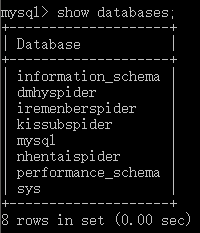
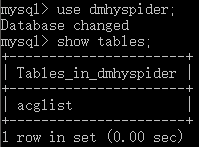
# 展示全部数据库 show databases; # 展示某个数据库中的全部表 show tables
1 2 3 4 5 6 7 8 9 10 11 12 13 14
# 展示acglist表中的全部列 show columns from acglist; /* +-------------+--------------+------+-----+---------+-------+ | Field | Type | Null | Key | Default | Extra | +-------------+--------------+------+-----+---------+-------+ | title | varchar(255) | NO | | NULL | | | sort | varchar(255) | NO | | NULL | | | size | varchar(255) | NO | | NULL | | | releasetime | varchar(255) | NO | | NULL | | | publisher | varchar(255) | NO | | NULL | | | magnet | varchar(255) | NO | PRI | NULL | | +-------------+--------------+------+-----+---------+-------+ */
1 2 3 4 5 6 7 8 9 10 11 12
# 显示广泛的服务器状态信息 show status # 显示创建特定数据库 show create database # 显示创建特定数据表 show create table # 显示授予用户(所有用户或特定用户)的安全权限 show grants # 显示服务器错误消息 show errors # 显示服务器警告消息 show warnings
show columns from acglist;有语法糖:
1
describe acglist;
第四章:检索数据
本章讲select
1 2 3 4 5 6 7 8
# 注意这里select的是[列] select col from table1 # 查找唯一值 select DISTINCT col from table2 # 限定检索的数量 select name from new_list limit 5; # 检索从第5行(不含)开始的6行(就是6-11行) select name from new_list limit 5, 6;
注意,对两列使用distinct,只有那么只有当两列都相同的时候才不会被检索出来
1
select distinct id name from new_list
注意:MySQL和很多语言一样,第一行的index是0不是1.所以select name from new_list limit 5, 6;严格来讲是检索从第5行(包含)开始的6行
1 2
# 这种加了点号的写法被称为'完全限定' select new_list.id from iremenberspider.new_list
# 注意order by在最后面 select id,page from commic_list where page=17 order by id # 字符串要加引号(单双引都行) select id from commic_list where languages="english"; # 注意使用between and,between and包括上下限 # 使用between and的时候没有where select id,page from commic_list where page between 17 and 20 order by id;
空值检查:is null
1 2
# 空值检查使用is null select id from commic_list where artists is null
第七章:数据过滤
本章讲NOT和IN操作符,AND子句的方式或OR子句
1 2 3 4 5 6
# and操作符 select id from commic_list where page < 17 and languages='english' # IN操作符用来指定条件范围. # 注意:这里就算page是int类型,查找出来的page只会是17和20.并不是17-20 select id,page from commic_list where page in (17,20) select id,page from commic_list where languages in ('english','japanese');
和python一样,MySQL的and优先级大于or.
1 2 3
# 虽然下面两个是一样的效果,但是IN操作符一般比OR操作符清单执行更快 select id,page from commic_list where page in (17,20) select id,page from commic_list where page = 17 or page = 20
not 可以放在between and可以避免使用or
1 2 3
# 虽然下面两个是一样的效果,但是not between and更直观 select id,page from commic_list where page not between 17 and 20 select id,page from commic_list where page > 20 or page < 17
第八章:使用通配符进行过滤
本章介绍通配符和LIKE
通配符
描述
%
替代 0 个或多个字符
_
替代一个字符
[charlist]
字符列中的任何单一字符
[^charlist] 或 [!charlist]
不在字符列中的任何单一字符
1 2
# 搜索以tags字段包含na的记录 select id,tags from commic_list where tags like '%na%';
尾空格可能会干扰通配符匹配。 例如,在保存词 anvil时,如果它后面有一个或多个空格,则子句WHERE prod_name LIKE ‘%anvil’将不会匹配它们,因为在最后的l 后有多余的字符。解决这个问题的一个简单的办法是在搜索模式最后附加一个%。一个更好的办法是使用函数去掉首尾空格。
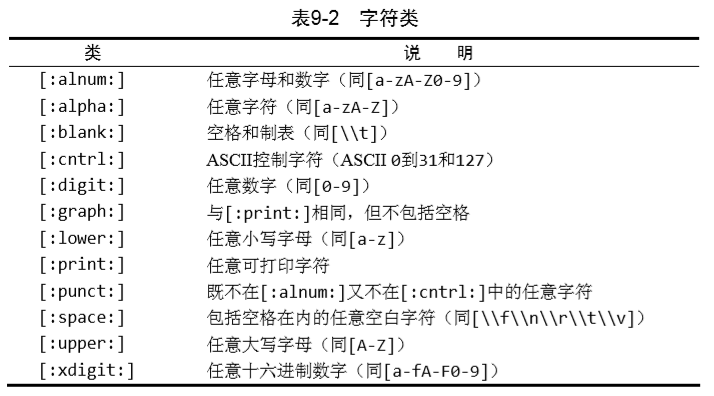
n 是一个非负整数。匹配确定的 n 次。例如,’o{2}’ 不能匹配 “Bob” 中的 ‘o’,但是能匹配 “food” 中的两个 o。
{n,m}
m 和 n 均为非负整数,其中n <= m。最少匹配 n 次且最多匹配 m 次。
注意:mysql用\转义时,要使用两个\,因为mysql要解释一个,然后正则要解释一个。
1 2 3 4
# 查找所有以(开头的记录 select id,title from commic_list where title regexp "^\\("; # page字段必须是12或14或16 select id,page from commic_list where page regexp '(12|14|16)$';
mysql里的反斜杠\因为要被mysql解释一个,所以,这也影响到了元字符
元字符
说明
\\f
换页
\\n
换行
\\r
回车
\\t
制表
\\v
纵向制表
值得一提的是反斜杠\就会变成三联杠\\\
LIKE和REGEXP的区别: LIKE是全字符串匹配.REGEXP是部分匹配. select * from commic_list where id like 123%78 当id是1234789的时候是匹配不到的. select * from commic_list where id regexp '^123.' 当id是12345的时候还是能匹配的到的.
简单来说,==LIKE匹配整个串,而REGEXP匹配子串==
注意MySQL中的正则表达式默认是不区分大小写的,否则要使用binary关键字
1 2
# title字段必须以大写A开头 select * from commic_list where title regexp binary '^A'
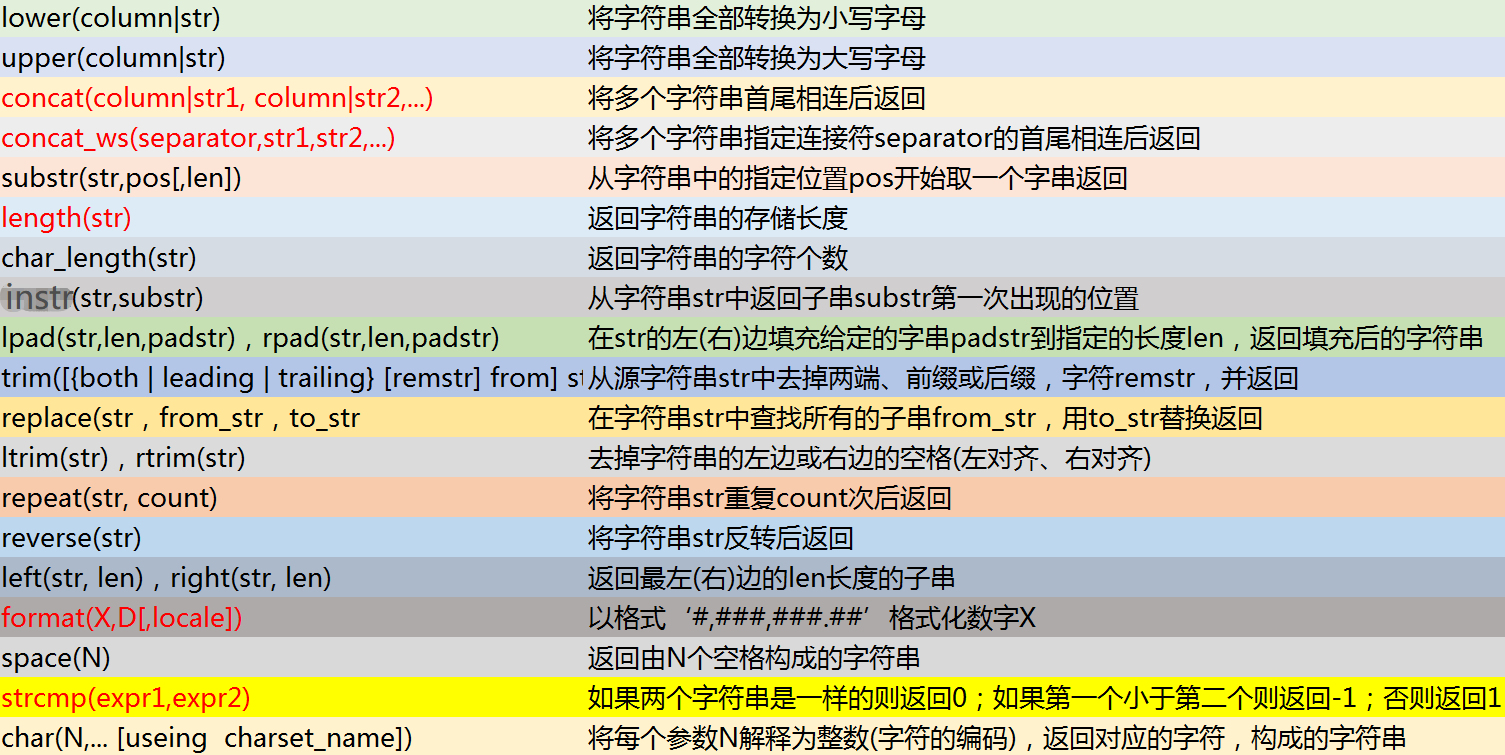
# 查找一个Y.Lie的人,但是数据库里输错了,输成了Y.Lee # 直接查找肯定是失败的 select name from table1 where name = 'Y.Lie' # return None # 这时可以使用soundex函数 select name from table1 where Soundex(name) = Soundex('Y.Lie')
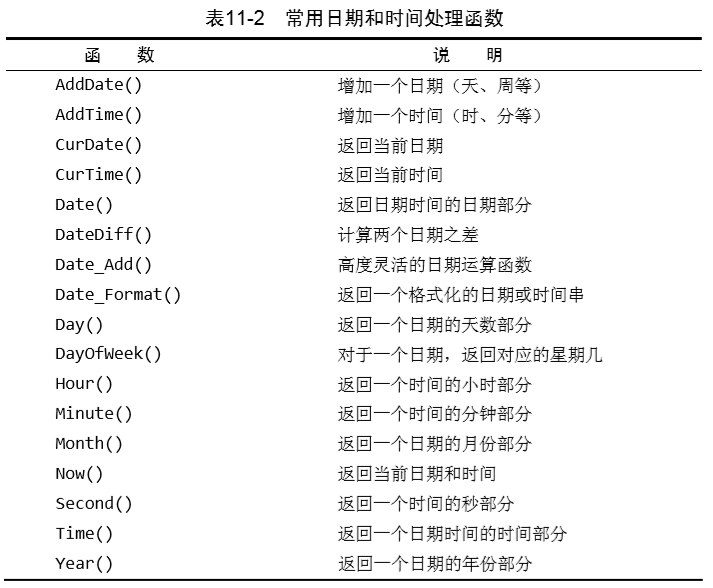
日期和时间处理函数
1 2 3
# order_date的类型是datetime(形如2019-01-01 11:30:05) # 这时需要使用date函数将其转化为日期格式(2019-01-01)(就是去掉后面的时间) select order_date from table1 where Date(order_date) = '2019-01-01'
1 2 3 4 5 6
# 匹配2019年9月的数据 select order_date from table1 where Date(order_date) between '2019-09-01' and '2019-9-30' # 或者使用month,year,day函数 select order_date from table1 where year(order_date)='2019' and month(order_date)='9'
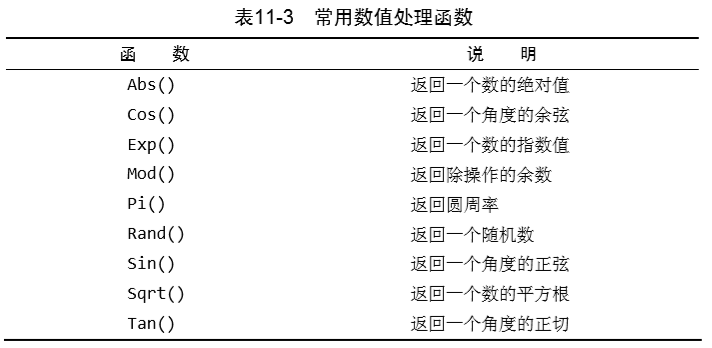
数值处理函数:
第十二章:汇总数据
本章介绍什么是SQL的聚集函数以及如何利用它们汇总表的数据。
汇总数据有以下几种:
确定表中行数(或者满足某个条件或包含某个特定值的行数)。
获得表中行组的和。
找出表列(或所有行或某些特定的行)的最大值、最小值和平均值。
聚集函数(aggregate function)常用只有五个:
函数
说明
AVG()
返回某列的平均值
COUNT()
返回某列的行数
MAX()
返回某列的最大值
MIN()
返回某列的最小值
SUM()
返回某列值之和
1 2 3 4 5 6 7 8 9 10 11 12 13 14 15 16
select avg(page) from commic_list where artists='yuzu' /* +-----------+ | avg(page) | +-----------+ | 29.8430 | +-----------+ */ select count(artists) from commic_list where languages='english'; /* +----------------+ | count(artists) | +----------------+ | 46 | +----------------+ */
# 简单来说就是先让page变成distinct了再求avg # 类似于python的avg(set(page))和avg(page)的区别 select (distinct avg(page)) as new from commic_list; /* +---------+ | new | +---------+ | 50.6182 | +---------+ */ select avg(page) as new from commic_list; /* +---------+ | new | +---------+ | 29.8430 | +---------+ */
select min(page) as min,max(page) as max,avg(page) as avg from commic_list; /* +------+------+---------+ | min | max | avg | +------+------+---------+ | 3 | 198 | 29.8430 | +------+------+---------+ */
# 计算每种语言的平均页数 select languages,avg(page) from commic_list group by languages; /* +-----------+-----------+ | languages | avg(page) | +-----------+-----------+ | chinese | 37.3333 | | english | 30.0870 | | japanese | 27.3130 | | text | 13.0000 | +-----------+-----------+ */ select languages,avg(page) from commic_list group by languages with rollup; /* +-----------+-----------+ | languages | avg(page) | +-----------+-----------+ | chinese | 37.3333 | | english | 30.0870 | | japanese | 27.3130 | | text | 13.0000 | | NULL | 29.8430 | +-----------+-----------+ */ # 上面的NULl其实就是对37.3333,30.0870,27.3130,13.0000再求一次平均值.
# 查找总页数大于150的作者 select artists,sum(page) from commic_list group by artists having sum(page) >150;
有另一种理解方法,WHERE在数据分组前进行过滤,HAVING在数据分组后进行过滤。
那么有没有同时使用where和having呢?只要在分组前过滤,然后在分组后再过滤一遍即可.
1 2 3 4 5 6
# 查找作品的语言是英语,同时总页数大于60的作者 select artists,languages,sum(page) from commic_list where languages = 'english' group by artists having sum(page) > 60;
分组和排序 GROUP BY和ORDER BY的差别:
order by
group by
排序产生的输出
分组行,但输出可能不是分组的顺序
任意列都可以使用(甚至非选择列都可以使用)
只能是选择列或表达式列,而且必须使用每个选择列表达式
不一定需要
如果与聚集函数一起使用列(或表达式),则必须使用
因为group by的顺序可能不是分组的顺序,所以有时候需要同时使用order by和group by
1
2
3
4
5
6
7
8
# 查找作品的语言是英语,同时总页数大于60的作者
# 然后按照总页数升序排列
select artists,languages,sum(page)
    from commic_list
    where languages = 'english'
    group by artists
    having sum(page) > 60
    order by sum(page);
# 计算less_table表中有,more_table表中也有的id总数
select count(id) from more_table
	where id in (select id from less_table);
/*
+-----------+
| count(id) |
+-----------+
|       200 |
+-----------+
*/
# 注意不可以如下使用,要使用子查询
select id from more_table where less_table.id = more_table.id;
# 或者改成
select id from less_table,more_table where less_table.id = more_table.id;