第8章 数据规整:聚合、合并和重塑

本章关注可以聚合、合并、重塑数据的⽅法。

8.1 层次化索引

层次化索引:使你能在⼀个轴上拥有多个(两个以上)索引级别。抽象点说,它使你能以低维度形式处理⾼维度数据。

简单来说,就是多层索引

1
2
3
4
5
6
7
8
9
10
11
12
13
14
15
16
17
18
19
20
21
22
23
import pandas as pd
import numpy as np


# 通过传入嵌套的列表作为index来创建多层索引
data = pd.Series(np.random.randn(9),
index=[['a', 'a', 'a', 'b', 'b', 'c', 'c', 'd', 'd'],
[1, 2, 3, 1, 3, 1, 2, 2, 3]])
print(data)
# a 1 0.616399
# 2 0.966187
# 3 -1.281433
# b 1 0.886411
# 3 -0.148181
# c 1 -0.145789
# 2 0.119735
# d 2 -0.333327
# 3 0.047652
# dtype: float64

print(data.index)
# MultiIndex(levels=[['a', 'b', 'c', 'd'], [1, 2, 3]],
# labels=[[0, 0, 0, 1, 1, 2, 2, 3, 3], [0, 1, 2, 0, 2, 0, 1, 1, 2]])

注意:

  • 通过传入列表的方式作为index来创建多层索引时嵌套的列表的len必须一致
  • 不能通过传入字典的方式作为index来创建多层索引
1
2
3
4
5
6
7
8
import pandas as pd
import numpy as np


# 不能通过传入字典的方式作为index来创建多层索引
data = pd.Series(np.random.randn(9),
index={'a':[1,2,3],'b':[1,3],'c':[1,2],'d':[2,3]})
# ValueError: Length of passed values is 9, index implies 4

对于⼀个层次化索引的对象,可以使⽤所谓的部分索引,使⽤它选取数据⼦集的操作更简单,也可以直接进行内部索引

1
2
3
4
5
6
7
8
9
10
11
12
13
14
15
16
17
18
19
20
21
22
23
24
25
26
27
28
29
30
31
32
33
34
35
36
37
38
39
40
41
42
43
44
45
46
47
48
import pandas as pd
import numpy as np


# 通过传入嵌套的列表作为index来创建多层索引
data = pd.Series(np.arange(10000,10009),
index=[['a', 'a', 'a', 'b', 'b', 'c', 'c', 'd', 'd'],
[1, 2, 3, 1, 3, 1, 2, 2, 3]])
print(data)
# a 1 10000
# 2 10001
# 3 10002
# b 1 10003
# 3 10004
# c 1 10005
# 2 10006
# d 2 10007
# 3 10008
# dtype: int32

# 部分索引
print(data['b'])
# 1 10003
# 3 10004
# dtype: int32

print(data['b':'c'])
# b 1 10003
# 3 10004
# c 1 10005
# 2 10006
# dtype: int32

# 花式索引,索引bd两个外层
print(data.loc[['b', 'd']])
# b 1 10003
# 3 10004
# d 2 10007
# 3 10008
# dtype: int32

# 在"内层"进行选取
# 先选择外层全部,然后选择每个外层的idx=2的行
print(data.loc[:, 2])
# a 10001
# c 10006
# d 10007
# dtype: int32

层次化索引在数据重塑和基于分组的操作(如⽣成透视表)中扮演着重要的⻆⾊。

  • se.unstack():
    让excel所谓的一维表变成二维表
  • se.stack():
    逆运算,让excel所谓的二维表变成一维表
1
2
3
4
5
6
7
8
9
10
11
12
13
14
15
16
17
18
19
20
21
22
23
24
25
26
27
28
29
30
31
32
33
34
35
36
37
38
39
40
41
import pandas as pd
import numpy as np


# 通过传入嵌套的列表作为index来创建多层索引
data = pd.Series(np.arange(10000,10009),
index=[['a', 'a', 'a', 'b', 'b', 'c', 'c', 'd', 'd'],
[1, 2, 3, 1, 3, 1, 2, 2, 3]])

print(data)
# a 1 10000
# 2 10001
# 3 10002
# b 1 10003
# 3 10004
# c 1 10005
# 2 10006
# d 2 10007
# 3 10008
# dtype: int32


print(data.unstack())
# 1 2 3
# a 10000.0 10001.0 10002.0
# b 10003.0 NaN 10004.0
# c 10005.0 10006.0 NaN
# d NaN 10007.0 10008.0


print(data.unstack().stack())
# a 1 10000.0
# 2 10001.0
# 3 10002.0
# b 1 10003.0
# 3 10004.0
# c 1 10005.0
# 2 10006.0
# d 2 10007.0
# 3 10008.0
# dtype: float64
  • DataFrame有两条轴,所以可以创建两个层次索引
  • 每层索引都可以取一个名字:
    df.index.names = [‘floor1’,’floor2’]
  • 层次索引的索引方法回忆numpy的索引方法,二者没有本质区别
1
2
3
4
5
6
7
8
9
10
11
12
13
14
15
16
17
18
19
20
21
22
23
24
25
26
27
28
29
30
31
32
33
34
35
36
37
38
39
40
41
42
43
44
45
46
47
48
49
50
51
import pandas as pd
import numpy as np


df = pd.DataFrame(np.arange(10000,10012).reshape((4, 3)),
index=[['a', 'a', 'b', 'b'], [1, 2, 1, 2]],
columns=[['Ohio', 'Ohio', 'Colorado'],
['Green', 'Red', 'Green']])


df.index.names = ['floor1','floor2']
df.columns.names = ['state', 'color']


print(df)
# state Ohio Colorado
# color Green Red Green
# floor1 floor2
# a 1 10000 10001 10002
# 2 10003 10004 10005
# b 1 10006 10007 10008
# 2 10009 10010 10011


print(df['Ohio'])
# color Green Red
# floor1 floor2
# a 1 10000 10001
# 2 10003 10004
# b 1 10006 10007
# 2 10009 10010


print(df['Ohio']['Green'])
# floor1 floor2
# a 1 10000
# 2 10003
# b 1 10006
# 2 10009
# Name: Green, dtype: int32


print(df['Ohio'].loc['a'])
# color Green Red
# floor2
# 1 10000 10001
# 2 10003 10004


print(df['Ohio']['Green'].loc['a'][1])
# 10000

第二种创建MultiIndex的方法:
独立使用MultiIndex对象from_arrays自行创建.之后就可以将这个idx赋给其他DataFrame或者Series对象了

1
2
3
4
5
6
7
8
9
10
11
12
13
14
15
16
17
18
import pandas as pd
import numpy as np


idx = pd.MultiIndex.from_arrays([['col1','col2'],
['inner1','inner2']])

print(idx)
# MultiIndex(levels=[['col1', 'col2'], ['inner1', 'inner2']],
# labels=[[0, 1], [0, 1]])


df = pd.DataFrame(np.arange(10000,10004).reshape((2, 2)),
index=idx)
print(df)
# 0 1
# col1 inner1 10000 10001
# col2 inner2 10002 10003

重排与分级排序

  • swaplevel:
    调换MultiIndex对象的两个层次index的顺序

  • sort_index:
    根据单个级别中的对数据进⾏排序。
    (既然是对数据进行排序,那么就只能对行进行排序了,不能对列进行排序,而且对列进行排序也没有意义)

  • 使用花式索引来重排列:

    1
    2
    3
    4
    5
    6
    7
    8
    9
    10
    11
    12
    13
    14
    15
    16
    17
    18
    19
    20
    21
    22
    23
    24
    25
    26
    27
    28
    29
    30
    31
    32
    33
    34
    35
    36
    37
    38
    39
    40
    41
    42
    43
    44
    45
    46
    47
    48
    49
    50
    51
    52
    53
    54
    55
    56
    57
    import pandas as pd
    import numpy as np


    df = pd.DataFrame(np.arange(10000,10012).reshape((4, 3)),
    index=[['a', 'a', 'b', 'b'], [1, 2, 1, 2]],
    columns=[['Ohio', 'Ohio', 'Colorado'],
    ['Green', 'Red', 'Green']])

    df.index.names = ['floor1','floor2']
    df.columns.names = ['state', 'color']

    print(df)
    # state Ohio Colorado
    # color Green Red Green
    # floor1 floor2
    # a 1 10000 10001 10002
    # 2 10003 10004 10005
    # b 1 10006 10007 10008
    # 2 10009 10010 10011

    # 调换MultiIndex对象的两个层次index的顺序
    df2 = df.swaplevel('floor1', 'floor2')

    print(type(df2))
    # <class 'pandas.core.frame.DataFrame'>

    print(df2)
    # state Ohio Colorado
    # color Green Red Green
    # floor2 floor1
    # 1 a 10000 10001 10002
    # 2 a 10003 10004 10005
    # 1 b 10006 10007 10008
    # 2 b 10009 10010 10011

    # 根据单个级别中的值对数据进⾏排序
    print(df.sort_index(level=1))
    # state Ohio Colorado
    # color Green Red Green
    # floor1 floor2
    # a 1 10000 10001 10002
    # b 1 10006 10007 10008
    # a 2 10003 10004 10005
    # b 2 10009 10010 10011


    # 交换floor2和floor1位置后,再根据值来排序
    print(df.swaplevel(0, 1).sort_index(level=0))
    # state Ohio Colorado
    # color Green Red Green
    # floor2 floor1
    # 1 a 10000 10001 10002
    # b 10006 10007 10008
    # 2 a 10003 10004 10005
    # b 10009 10010 10011

    使用花式索引来实现列的排序:

    1
    2
    3
    4
    5
    6
    7
    8
    9
    10
    11
    12
    13
    14
    15
    16
    17
    18
    19
    20
    21
    import pandas as pd
    import numpy as np


    # 通过传入嵌套的列表作为index来创建多层索引
    data = pd.DataFrame(np.arange(10000,10012).reshape((-1,4)),
    columns=['col1','col2','col3','col4'])

    print(data)
    # col1 col2 col3 col4
    # 0 10000 10001 10002 10003
    # 1 10004 10005 10006 10007
    # 2 10008 10009 10010 10011

    # 使用花式索引来实现列的排序
    data = data[['col4','col2','col3','col1']]
    print(data)
    # col4 col2 col3 col1
    # 0 10003 10001 10002 10000
    # 1 10007 10005 10006 10004
    # 2 10011 10009 10010 10008

根据级别汇总统计

许多对DataFrame和Series的描述和汇总统计都有⼀个level选项,它⽤于指定在某条轴上求和的级别。
简单来说,==当DataFrame或Series有多重索引的时候,可以使用level来合并数据==

1
2
3
4
5
6
7
8
9
10
11
12
13
14
15
16
17
18
19
20
21
22
23
24
25
26
27
28
29
30
31
32
33
34
35
36
37
38
39
40
41
42
43
44
45
import pandas as pd
import numpy as np


df = pd.DataFrame(np.arange(10000,10012).reshape((4, 3)),
index=[['a', 'a', 'b', 'b'], [1, 2, 1, 2]],
columns=[['Ohio', 'Ohio', 'Colorado'],
['Green', 'Red', 'Green']])

df.index.names = ['floor1','floor2']
df.columns.names = ['state', 'color']

print(df)
# state Ohio Colorado
# color Green Red Green
# floor1 floor2
# a 1 10000 10001 10002
# 2 10003 10004 10005
# b 1 10006 10007 10008
# 2 10009 10010 10011


# 当是多重索引的时候,可以使用level来合并数据
print(df.sum(level='floor1'))
# state Ohio Colorado
# color Green Red Green
# floor1
# a 20003 20005 20007
# b 20015 20017 20019

print(df.sum(level='floor2'))
# state Ohio Colorado
# color Green Red Green
# floor2
# 1 20006 20008 20010
# 2 20012 20014 20016


print(df.sum(level='color', axis=1))
# color Green Red
# floor1 floor2
# a 1 20002 10001
# 2 20008 10004
# b 1 20014 10007
# 2 20020 10010

这其实是利⽤了pandas的groupby功能


使⽤DataFrame的列进⾏索引

set_index函数:

  • 将其⼀个或多个列转换为行索引,如果传入的参数大于等于2,那么就会形成多级索引
  • 默认情况下,那些列会从DataFrame中移除,但也可以使用drop=False将其保留下来:

reset_index:
功能跟set_index刚好相反,层次化索引的级别会被转移到列⾥⾯.
就是说不管你现在的index是什么,全部都会变成columns(index变成RangeIndex)

1
2
3
4
5
6
7
8
9
10
11
12
13
14
15
16
17
18
19
20
21
22
23
24
25
26
27
28
29
30
31
32
33
34
35
36
37
38
39
40
41
42
43
44
45
46
47
48
49
50
51
52
53
54
import pandas as pd
import numpy as np


frame = pd.DataFrame({'a': range(7), 'b': range(7, 0, -1),
'c': ['one', 'one', 'one', 'two', 'two',
'two', 'two'],
'd': [0, 1, 2, 0, 1, 2, 3]})

print(frame)
# a b c d
# 0 0 7 one 0
# 1 1 6 one 1
# 2 2 5 one 2
# 3 3 4 two 0
# 4 4 3 two 1
# 5 5 2 two 2
# 6 6 1 two 3


frame2 = frame.set_index(['c', 'd'])
print(frame2)
# a b
# c d
# one 0 0 7
# 1 1 6
# 2 2 5
# two 0 3 4
# 1 4 3
# 2 5 2
# 3 6 1

frame3 = frame.set_index(['c', 'd'],drop=False)
print(frame3)
# a b c d
# c d
# one 0 0 7 one 0
# 1 1 6 one 1
# 2 2 5 one 2
# two 0 3 4 two 0
# 1 4 3 two 1
# 2 5 2 two 2
# 3 6 1 two 3

# 不管原来的Index是什么,全部都会变成RangeIndex
print(frame2.reset_index())
# c d a b
# 0 one 0 0 7
# 1 one 1 1 6
# 2 one 2 2 5
# 3 two 0 3 4
# 4 two 1 4 3
# 5 two 2 5 2
# 6 two 3 6 1

8.2 合并数据集

  • pandas.merge:
    根据⼀个或多个键将不同DataFrame中的⾏连接起来。类似于数据库的join操作。默认做inner join
  • pandas.concat:
    沿着⼀条轴将多个对象堆叠到⼀起。
  • 实例⽅法combine_first:
    将重复数据编接在⼀起,⽤⼀个对象中的值填充另⼀个对象中的缺失值。

数据库风格的DataFrame合并

  • pandas.merge:
    默认做inner join.拥有how属性,当how='left/right/outer'可以执行left join on和right join on和全外连接

  • pandas.merge如果不指定on参数,那么重叠列的列名当做键。最好还是明确指定一下

  • left_on参数和right_on参数:
    当左右列名不相同的时候使用

    左侧DataFrame中用作连接键的列名
    右侧DataFrame中用作 连接键的列名

  • suffixes参数:
    当左右对象中存在除连接键外的同名列时,指定附加到左右两个DataFrame对象的重叠列名上的字符串(就是给同名列各自加一个小尾巴)

1
2
3
4
5
6
7
8
9
10
11
12
13
14
15
16
17
18
19
20
21
22
23
24
25
26
27
28
29
30
31
32
33
34
35
36
37
38
39
40
41
42
43
44
45
46
47
48
49
50
51
52
53
54
55
56
57
58
59
60
61
import pandas as pd
import numpy as np


df1 = pd.DataFrame({'key': ['b', 'b', 'a', 'c', 'a', 'a', 'b'],
'data1': range(7)})
df2 = pd.DataFrame({'key': ['a', 'b', 'd'],
'data2': range(3)})

print(df1)
# key data1
# 0 b 0
# 1 b 1
# 2 a 2
# 3 c 3
# 4 a 4
# 5 a 5
# 6 b 6


print(df2)
# key data2
# 0 a 0
# 1 b 1
# 2 d 2


# 就是数据库中的一对多的join链接
# df2为一,df1为多,默认inner join on
# 如果不指定on参数,就会将重叠列的列名作为键
print(pd.merge(df1, df2))
# key data1 data2
# 0 b 0 1
# 1 b 1 1
# 2 b 6 1
# 3 a 2 0
# 4 a 4 0
# 5 a 5 0

# 明确指定join on的列
print(pd.merge(df1, df2,on='key'))
# key data1 data2
# 0 b 0 1
# 1 b 1 1
# 2 b 6 1
# 3 a 2 0
# 4 a 4 0
# 5 a 5 0


# 全外连接
print(pd.merge(df1, df2,on='key',how='outer'))
# key data1 data2
# 0 b 0.0 1.0
# 1 b 1.0 1.0
# 2 b 6.0 1.0
# 3 a 2.0 0.0
# 4 a 4.0 0.0
# 5 a 5.0 0.0
# 6 c 3.0 NaN
# 7 d NaN 2.0
1
2
3
4
5
6
7
8
9
10
11
12
13
14
15
16
17
18
19
20
21
22
23
24
25
26
27
28
29
30
31
32
33
34
35
36
37
import pandas as pd
import numpy as np


df3 = pd.DataFrame({'lkey': ['b', 'b', 'a', 'c', 'a', 'a', 'b'],
'data1': range(7)})
df4 = pd.DataFrame({'rkey': ['a', 'b', 'd'],
'data2': range(3)})

print(df3)
# lkey data1
# 0 b 0
# 1 b 1
# 2 a 2
# 3 c 3
# 4 a 4
# 5 a 5
# 6 b 6

print(df4)
# rkey data2
# 0 a 0
# 1 b 1
# 2 d 2

# 两个列的列名不同,使用left_on和right_on指定
# 下面代码用SQL解释为:
# df3 inner join df4 on df3.lkey = df4.rkey
df = pd.merge(df3, df4, left_on='lkey', right_on='rkey')
print(df)
# lkey data1 rkey data2
# 0 b 0 b 1
# 1 b 1 b 1
# 2 b 6 b 1
# 3 a 2 a 0
# 4 a 4 a 0
# 5 a 5 a 0

注意:

  • 我们在数据库使用join on的时候是不会遇到多对多的关系的,永远都是一对多.
    比如:班级表和学生表.班级是一,学生是多.学生表班级号列是外键.
    班级表存储了全校的所有班级,如1班,2班.==在班级表里是不会存在相同的班级号的==(比如班级表里存在两个1班)
  • 但是在pandas中,两个表可能存在多对多的关系
  • ==多对多连接产⽣的是⾏的笛卡尔积==。
1
2
3
4
5
6
7
8
9
10
11
12
13
14
15
16
17
18
19
20
21
22
23
24
25
26
27
28
29
30
31
32
33
34
35
36
37
38
39
40
41
import pandas as pd
import numpy as np


df1 = pd.DataFrame({'key': ['b', 'b', 'a', 'c', 'a', 'b'],
'data1': range(6)})
df2 = pd.DataFrame({'key': ['a', 'b', 'a', 'b', 'd'],
'data2': range(5)})

print(df1)
# key data1
# 0 b 0
# 1 b 1
# 2 a 2
# 3 c 3
# 4 a 4
# 5 b 5

print(df2)
# key data2
# 0 a 0
# 1 b 1
# 2 a 2
# 3 b 3
# 4 d 4

# df1和df2的key都是多,说明这是多对多的关系
# 多对多的关系返回的是行的笛卡尔积
print(pd.merge(df1, df2, on='key', how='left'))
# key data1 data2
# 0 b 0 1.0
# 1 b 0 3.0
# 2 b 1 1.0
# 3 b 1 3.0
# 4 a 2 0.0
# 5 a 2 2.0
# 6 c 3 NaN
# 7 a 4 0.0
# 8 a 4 2.0
# 9 b 5 1.0
# 10 b 5 3.0

由于左边的DataFrame有3个”b”⾏,右边的有2个,所以最终结果中就有6个”b”⾏。连接⽅式只影响出现在结果中的不同的键的值

SQL为了保证约束,也不会存在多键连接的问题,但是pandas可以:
使用多键连接就类似于形成了一个联合外键的东西

1
2
3
4
5
6
7
8
9
10
11
12
13
14
15
16
17
18
19
20
21
22
23
24
25
26
27
28
29
30
31
32
33
34
import pandas as pd
import numpy as np


left = pd.DataFrame({'key1': ['foo', 'foo', 'bar'],
'key2': ['one', 'two', 'one'],
'lval': [1, 2, 3]})
right = pd.DataFrame({'key1': ['foo', 'foo', 'bar', 'bar'],
'key2': ['one', 'one', 'one', 'two'],
'rval': [4, 5, 6, 7]})
print(left)
# key1 key2 lval
# 0 foo one 1
# 1 foo two 2
# 2 bar one 3

print(right)
# key1 key2 rval
# 0 foo one 4
# 1 foo one 5
# 2 bar one 6
# 3 bar two 7


# 多键连接
df = pd.merge(left, right, on=['key1', 'key2'], how='outer')

print(df)
# key1 key2 lval rval
# 0 foo one 1.0 4.0
# 1 foo one 1.0 5.0
# 2 foo two 2.0 NaN
# 3 bar one 3.0 6.0
# 4 bar two NaN 7.0

注意:在进⾏列-列连接时,DataFrame对象中的索引会被
丢弃。

suffixes:
当左右对象中存在除连接键外的同名列时,结果集中的区分方式,可以各加一个小尾巴。

1
2
3
4
5
6
7
8
9
10
11
12
13
14
15
16
17
18
19
20
21
22
23
24
25
26
27
28
29
30
31
32
33
34
35
36
37
38
39
40
41
import pandas as pd
import numpy as np


left = pd.DataFrame({'key1': ['foo', 'foo', 'bar'],
'key2': ['one', 'two', 'one'],
'lval': [1, 2, 3]})
right = pd.DataFrame({'key1': ['foo', 'foo', 'bar', 'bar'],
'key2': ['one', 'one', 'one', 'two'],
'rval': [4, 5, 6, 7]})
print(left)
# key1 key2 lval
# 0 foo one 1
# 1 foo two 2
# 2 bar one 3

print(right)
# key1 key2 rval
# 0 foo one 4
# 1 foo one 5
# 2 bar one 6
# 3 bar two 7


print(pd.merge(left, right, on='key1'))
# key1 key2_x lval key2_y rval
# 0 foo one 1 one 4
# 1 foo one 1 one 5
# 2 foo two 2 one 4
# 3 foo two 2 one 5
# 4 bar one 3 one 6
# 5 bar one 3 two 7

print(pd.merge(left, right, on='key1', suffixes=('_left', '_right')))
# key1 key2_left lval key2_right rval
# 0 foo one 1 one 4
# 1 foo one 1 one 5
# 2 foo two 2 one 4
# 3 foo two 2 one 5
# 4 bar one 3 one 6
# 5 bar one 3 two 7

right_index:
使用索引作为连接键

1
2
3
4
5
6
7
8
9
10
11
12
13
14
15
16
17
18
19
20
21
22
23
24
25
26
27
28
29
30
31
32
33
34
35
36
37
38
39
import pandas as pd
import numpy as np


left1 = pd.DataFrame({'key': ['a', 'b', 'a', 'a', 'b', 'c'],
'value': range(6)})
right1 = pd.DataFrame({'group_val': [3.5, 7]}, index=['a', 'b'])

print(left1)
# key value
# 0 a 0
# 1 b 1
# 2 a 2
# 3 a 3
# 4 b 4
# 5 c 5

print(right1)
# group_val
# a 3.5
# b 7.0

print(pd.merge(left1, right1, left_on='key', right_index=True))
# key value group_val
# 0 a 0 3.5
# 2 a 2 3.5
# 3 a 3 3.5
# 1 b 1 7.0
# 4 b 4 7.0

# DataFrame中的连接键位于其索引中
# right_index=True:使用索引作为连接键
print(pd.merge(left1, right1, left_on='key',right_index=True))
# key value group_val
# 0 a 0 3.5
# 2 a 2 3.5
# 3 a 3 3.5
# 1 b 1 7.0
# 4 b 4 7.0

双方都使用index作为连接键:

1
2
3
4
5
6
7
8
9
10
11
12
13
14
15
16
17
18
19
20
21
22
23
24
25
26
27
28
29
30
31
32
import pandas as pd
import numpy as np


left2 = pd.DataFrame([[1., 2.], [3., 4.], [5., 6.]],
index=['a', 'c', 'e'],
columns=['Ohio', 'Nevada'])
right2 = pd.DataFrame([[7., 8.], [9., 10.], [11., 12.], [13, 14]],
index=['b', 'c', 'd', 'e'],
columns=['Missouri', 'Alabama'])

print(left2)
# Ohio Nevada
# a 1.0 2.0
# c 3.0 4.0
# e 5.0 6.0

print(right2)
# Missouri Alabama
# b 7.0 8.0
# c 9.0 10.0
# d 11.0 12.0
# e 13.0 14.0

# 双方都使用index作为连接键
print(pd.merge(left2, right2, how='outer', left_index=True, right_index=True))
# Ohio Nevada Missouri Alabama
# a 1.0 2.0 NaN NaN
# b NaN NaN 7.0 8.0
# c 3.0 4.0 9.0 10.0
# d NaN NaN 11.0 12.0
# e 5.0 6.0 13.0 14.0

merge函数参数说明:

  • left与right:
    两个不同的DataFrame
  • how:
    指的是合并(连接)的方式有inner(内连接),left(左外连接),right(右外连接),outer(全外连接);默认为inner
  • on :
    指的是用于连接的列索引名称。必须存在右右两个DataFrame对象中,如果没有指定且其他参数也未指定则以两个DataFrame的列名交集做为连接键
  • left_on:
    左则DataFrame中用作连接键的列名;这个参数中左右列名不相同,但代表的含义相同时非常有用。
  • right_on:
    右则DataFrame中用作 连接键的列名
  • left_index:
    使用左则DataFrame中的行索引做为连接键
  • right_index:
    使用右则DataFrame中的行索引做为连接键
  • sort:
    默认为True,将合并的数据进行排序。在大多数情况下设置为False可以提高性能
  • suffixes:
    字符串值组成的元组,用于指定当左右DataFrame存在相同列名时在列名后面附加的后缀名称,默认为(‘_x’,’_y’)
  • copy:
    默认为True,总是将数据复制到数据结构中;大多数情况下设置为False可以提高性能
  • indicator:
    显示合并数据中来源情况(指明每个⾏的来源);如只来自己于左边(left_only)、右边(right_only)、两者(both)

索引上的合并

对于层次化索引的数据,事情就有点复杂了,因为索引的合并默认是多键合并

就是说,一旦用上多层次索引,那么就必须要用多键连接

1
2
3
4
5
6
7
8
9
10
11
12
13
14
15
16
17
18
19
20
21
22
23
24
25
26
27
28
29
30
31
32
33
34
35
36
37
38
39
40
41
42
43
44
45
46
47
48
49
50
import pandas as pd
import numpy as np


lefth = pd.DataFrame({'key1': ['Ohio', 'Ohio', 'Ohio','Nevada', 'Nevada'],
'key2': [2000, 2001, 2002, 2001, 2002],
'data': np.arange(5.)})
righth = pd.DataFrame(np.arange(12).reshape((6, 2)),
index=[['Nevada', 'Nevada', 'Ohio', 'Ohio','Ohio', 'Ohio'],
[2001, 2000, 2000, 2000, 2001, 2002]],
columns=['event1', 'event2'])

print(lefth)
# key1 key2 data
# 0 Ohio 2000 0.0
# 1 Ohio 2001 1.0
# 2 Ohio 2002 2.0
# 3 Nevada 2001 3.0
# 4 Nevada 2002 4.0

print(righth)
# event1 event2
# Nevada 2001 0 1
# 2000 2 3
# Ohio 2000 4 5
# 2000 6 7
# 2001 8 9
# 2002 10 11


# 索引的合并默认是多键合并,要使用多键连接
# 第一层index对应key1,第二层index对应key2
print(pd.merge(lefth, righth, left_on=['key1', 'key2'], right_index=True))
# key1 key2 data event1 event2
# 0 Ohio 2000 0.0 4 5
# 0 Ohio 2000 0.0 6 7
# 1 Ohio 2001 1.0 8 9
# 2 Ohio 2002 2.0 10 11
# 3 Nevada 2001 3.0 0 1


print(pd.merge(lefth, righth, left_on=['key1', 'key2'], right_index=True, how='outer',sort=False))
# key1 key2 data event1 event2
# 0 Ohio 2000 0.0 4.0 5.0
# 0 Ohio 2000 0.0 6.0 7.0
# 1 Ohio 2001 1.0 8.0 9.0
# 2 Ohio 2002 2.0 10.0 11.0
# 3 Nevada 2001 3.0 0.0 1.0
# 4 Nevada 2002 4.0 NaN NaN
# 4 Nevada 2000 NaN 2.0 3.0

上面的方法很复杂,这时就可以使用更加便捷的join实例⽅法
它能更为⽅便地实现按索引合并。(它还可⽤于合并多个带有相同或相似索引的DataFrame对象,但要求没有重叠的列)

重要:
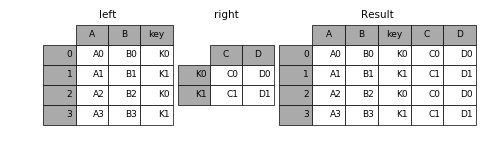
默认按索引合并,可以合并相同或相似的索引,==不管他们有没有重叠列。==如果有on参数,就会把右图的行索引和左图的列进行join

  • on参数:

    在实际应用中如果==右表的索引值正是左表的某一列的值==,这时可以通过将 右表的索引 和 左表的列 对齐合并这样灵活的方式进行合并。

    1
    2
    3
    4
    5
    6
    7
    8
    9
    10
    11
    import pandas as pd

    left = pd.DataFrame({'A': ['A0', 'A1', 'A2', 'A3'],
    'B': ['B0', 'B1', 'B2', 'B3'],
    'key': ['K0', 'K1', 'K0', 'K1']})

    right = pd.DataFrame({'C': ['C0', 'C1'],
    'D': ['D0', 'D1']},
    index=['K0', 'K1'])

    result = left.join(right, on='key')

    这里写图片描述

  • suffix后缀参数:
    给每个表的重复列名添加小尾巴

  • 组合多个dataframe:
    传入元素为dataframe的列表或者tuple。一次join多个,一次解决多次烦恼

    1
    2
    3
    4
    5
    6
    7
    8
    9
    10
    11
    12
    13
    14
    15
    16
    17
    18
    19
    20
    21
    22
    23
    24
    25
    26
    27
    28
    29
    30
    31
    32
    33
    34
    35
    36
    37
    38
    39
    40
    41
    42
    43
    44
    45
    46
    47
    48
    49
    50
    51
    import pandas as pd
    import numpy as np


    left2 = pd.DataFrame([[1., 2.], [3., 4.], [5., 6.]],
    index=['a', 'c', 'e'],
    columns=['Ohio', 'Nevada'])

    right2 = pd.DataFrame([[7., 8.], [9., 10.], [11., 12.], [13, 14]],
    index=['b', 'c', 'd', 'e'],
    columns=['Missouri', 'Alabama'])

    another = pd.DataFrame([[7., 8.], [9., 10.], [11., 12.], [16., 17.]],
    index=['a', 'c', 'e', 'f'],
    columns=['New York', 'Oregon'])


    print(left2)
    # Ohio Nevada
    # a 1.0 2.0
    # c 3.0 4.0
    # e 5.0 6.0

    print(right2)
    # Missouri Alabama
    # b 7.0 8.0
    # c 9.0 10.0
    # d 11.0 12.0
    # e 13.0 14.0

    print(another)
    # New York Oregon
    # a 7.0 8.0
    # c 9.0 10.0
    # e 11.0 12.0
    # f 16.0 17.0

    print(left2.join([right2, another]))
    # Ohio Nevada Missouri Alabama New York Oregon
    # a 1.0 2.0 NaN NaN 7.0 8.0
    # c 3.0 4.0 9.0 10.0 9.0 10.0
    # e 5.0 6.0 13.0 14.0 11.0 12.0

    print(left2.join([right2, another], how='outer'))
    # Ohio Nevada Missouri Alabama New York Oregon
    # a 1.0 2.0 NaN NaN 7.0 8.0
    # b NaN NaN 7.0 8.0 NaN NaN
    # c 3.0 4.0 9.0 10.0 9.0 10.0
    # d NaN NaN 11.0 12.0 NaN NaN
    # e 5.0 6.0 13.0 14.0 11.0 12.0
    # f NaN NaN NaN NaN 16.0 17.0

join的实际使用:

1
2
3
4
5
6
7
8
9
10
11
12
13
14
15
16
17
18
19
20
21
22
23
24
25
26
27
28
29
30
31
32
33
34
35
36
37
38
39
40
41
42
43
44
45
46
import pandas as pd
import numpy as np


left1 = pd.DataFrame({'key': ['a', 'b', 'a', 'a', 'b', 'c'],
'value': range(6)})
right1 = pd.DataFrame({'group_val': [3.5, 7]}, index=['a', 'b'])


print(left1)
# key value
# 0 a 0
# 1 b 1
# 2 a 2
# 3 a 3
# 4 b 4
# 5 c 5


print(right1)
# group_val
# a 3.5
# b 7.0


# 把右图的index和左图的key列进行连接
print(left1.join(right1, on='key'))
# key value group_val
# 0 a 0 3.5
# 1 b 1 7.0
# 2 a 2 3.5
# 3 a 3 3.5
# 4 b 4 7.0
# 5 c 5 NaN


# 没有on参数的情况下只会查找两个表的行索引,不管列有没有重叠
# 这里因为没有相同或相似的列,所以group_val为NaN
print(left1.join(right1))
# key value group_val
# 0 a 0 NaN
# 1 b 1 NaN
# 2 a 2 NaN
# 3 a 3 NaN
# 4 b 4 NaN
# 5 c 5 NaN

两种连接方式的对比:

  • 使用merge的left_index和right_index参数
  • 使用DataFrame(left2)的实例方法join
1
2
3
4
5
6
7
8
9
10
11
12
13
14
15
16
17
18
19
20
21
22
23
24
25
26
27
28
29
30
31
32
33
34
35
36
37
38
39
40
41
42
43
44
import pandas as pd
import numpy as np


left2 = pd.DataFrame([[1., 2.], [3., 4.], [5., 6.]],
index=['a', 'c', 'e'],
columns=['Ohio', 'Nevada'])
right2 = pd.DataFrame([[7., 8.], [9., 10.], [11., 12.], [13, 14]],
index=['b', 'c', 'd', 'e'],
columns=['Missouri', 'Alabama'])

print(left2)
# Ohio Nevada
# a 1.0 2.0
# c 3.0 4.0
# e 5.0 6.0

print(right2)
# Missouri Alabama
# b 7.0 8.0
# c 9.0 10.0
# d 11.0 12.0
# e 13.0 14.0


# 使用merge的left_index和right_index参数
print(pd.merge(left2, right2, how='outer', left_index=True, right_index=True))
# Ohio Nevada Missouri Alabama
# a 1.0 2.0 NaN NaN
# b NaN NaN 7.0 8.0
# c 3.0 4.0 9.0 10.0
# d NaN NaN 11.0 12.0
# e 5.0 6.0 13.0 14.0


# 使用DataFrame(left2)的实例方法join
# 因为没有on参数,会比较两个表的行索引值来进行join
print(left2.join(right2, how='outer'))
# Ohio Nevada Missouri Alabama
# a 1.0 2.0 NaN NaN
# b NaN NaN 7.0 8.0
# c 3.0 4.0 9.0 10.0
# d NaN NaN 11.0 12.0
# e 5.0 6.0 13.0 14.0

因为⼀些历史版本的遗留,DataFrame的join⽅法默认使⽤的是左连接,保留左边表的⾏索引。

轴向连接

  • 连接(concatenation)、绑定(binding)或堆叠(stacking)指的都是轴向连接
  • 轴向连接,顾名思义,就是同一个轴的数据连接.不管数据如何,不管列于列之间有没有关系,就只会发生连接(沿着一条轴将多个对象堆叠到一起)
  • concat方法相当于数据库中的全连接(UNION ALL)
  • 拥有axis参数
    1. 默认的axis=0 情况下,pd.concat([obj1,obj2]) 函数的效果与 obj1.append(obj2) 是相同的;
    2. 在 axis=1 的情况下,pd.concat([df1,df2],axis=1) 的效果与 pd.merge(df1,df2,left_index=True,right_index=True,how=’outer’) 是相同的
  • join_axes参数:
    自定义索引。说人话**:指定部分索引进行连接**
  • keys参数:
    创建层次化索引,会将每个表制作成一个外层,每个表的列就是内层.
    注意:如果传入的两个表不是list形式而是dict形式,那么也会创建多级索引
  • ignore_index:
    重建索引

NumPy的轴线连接函数:
concatenation函数

1
2
3
4
5
6
7
8
9
10
11
12
13
14
15
16
17
18
19
20
21
22
23
24
25
26
27
28
29
30
import numpy as np


arr1 = np.arange(12).reshape((3, 4))
print(arr1)
# [[ 0 1 2 3]
# [ 4 5 6 7]
# [ 8 9 10 11]]


arr2 = np.arange(10000,10012).reshape((3, 4))
print(arr2)
# [[10000 10001 10002 10003]
# [10004 10005 10006 10007]
# [10008 10009 10010 10011]]


print(np.concatenate([arr1, arr2], axis=1))
# [[ 0 1 2 3 10000 10001 10002 10003]
# [ 4 5 6 7 10004 10005 10006 10007]
# [ 8 9 10 11 10008 10009 10010 10011]]


print(np.concatenate([arr1, arr2], axis=0))
# [[ 0 1 2 3]
# [ 4 5 6 7]
# [ 8 9 10 11]
# [10000 10001 10002 10003]
# [10004 10005 10006 10007]
# [10008 10009 10010 10011]]

pandas的轴向连接函数:
concat函数:

1
2
3
4
5
6
7
8
9
10
11
12
13
14
15
16
17
18
19
20
21
22
23
24
25
26
27
28
29
30
31
32
33
34
35
36
37
38
39
40
41
42
43
44
45
46
47
48
49
from pandas import Series,DataFrame


series1 = Series(range(2),index = ['a','b'])
series2 = Series(range(3),index = ['c','d','e'])
series3 = Series(range(2),index = ['f','g'])


print(series1)
# a 0
# b 1
# dtype: int64

print(series2)
# c 0
# d 1
# e 2
# dtype: int64

print(series3)
# f 0
# g 1
# dtype: int64

# 默认axis=0
y = pd.concat([series1,series2,series3])
print(y)
# a 0
# b 1
# c 0
# d 1
# e 2
# f 0
# g 1
# dtype: int64

print(type(y))
# <class 'pandas.core.series.Series'>

x = pd.concat([series1,series3],axis=1)
print(x)
# 0 1
# a 0.0 NaN
# b 1.0 NaN
# f NaN 0.0
# g NaN 1.0

print(type(x))
# <class 'pandas.core.frame.DataFrame'>

对于series,两种连接后的类型不同,可以看出,concat的操作仅仅是单纯的连接,并没有涉及到数据的整合。如果想要进行整合,还是使用merge的方法。

join里的how参数在concat里是join参数,默认为outer

1
2
3
4
5
6
7
8
9
10
11
12
13
14
15
16
17
18
19
20
21
22
23
24
25
26
27
28
29
30
31
32
33
34
35
36
37
38
39
40
41
42
43
44
45
46
47
48
49
50
51
52
53
54
55
56
57
58
59
60
61
62
63
64
65
66
67
68
69
70
71
72
73
import pandas as pd
import numpy as np


s1 = pd.Series([0, 1], index=['a', 'b'])
s3 = pd.Series([5, 6], index=['f', 'g'])
s4 = pd.concat([s1, s3])

print(s1)
# a 0
# b 1
# dtype: int64

print(s3)
# f 5
# g 6
# dtype: int64

print(s4)
# a 0
# b 1
# f 5
# g 6
# dtype: int64

print(pd.concat([s1, s4], axis=1))
# 0 1
# a 0.0 0
# b 1.0 1
# f NaN 5
# g NaN 6

print(pd.concat([s1, s4], axis=1, join='inner'))
# 0 1
# a 0 0
# b 1 1


# 指定索引名称:join_axes(指定要在其它轴上使⽤的索引)
print(pd.concat([s1, s4], axis=1, join_axes=[['a', 'c', 'b', 'e']]))
# 0 1
# a 0.0 0.0
# c NaN NaN
# b 1.0 1.0
# e NaN NaN


print(pd.concat([s1, s1, s3]))
# a 0
# b 1
# a 0
# b 1
# f 5
# g 6
# dtype: int64

# key:创建多级索引.会将每个表制作成一个外层
result = pd.concat([s1, s1, s3], keys=['one', 'two', 'three'])
print(result)
# one a 0
# b 1
# two a 0
# b 1
# three f 5
# g 6
# dtype: int64


print(result.unstack())
# a b f g
# one 0.0 1.0 NaN NaN
# two 0.0 1.0 NaN NaN
# three NaN NaN 5.0 6.0

有两种方式创建多级索引:

  • 使用keys参数
  • 传入的两张表是dict形式
1
2
3
4
5
6
7
8
9
10
11
12
13
14
15
16
17
18
19
20
21
22
23
24
25
26
27
28
29
30
31
32
33
34
35
36
37
38
39
40
41
42
43
44
45
import pandas as pd
import numpy as np


df1 = pd.DataFrame(np.arange(6).reshape(3, 2), index=['a', 'b', 'c'],
columns=['one', 'two'])
df2 = pd.DataFrame(5 + np.arange(4).reshape(2, 2), index=['a', 'c'],
columns=['three', 'four'])
print(df1)
# one two
# a 0 1
# b 2 3
# c 4 5

print(df2)
# three four
# a 5 6
# c 7 8

# 使用key参数创建多级索引
print(pd.concat([df1, df2], axis=1, keys=['level1', 'level2']))
# level1 level2
# one two three four
# a 0 1 5.0 6.0
# b 2 3 NaN NaN
# c 4 5 7.0 8.0

# 传入的两个表是dict形式的话,也会创建多级列表
print(pd.concat({'level1': df1, 'level2': df2}, axis=1))
# level1 level2
# one two three four
# a 0 1 5.0 6.0
# b 2 3 NaN NaN
# c 4 5 7.0 8.0

# names为每个层级索引取一个名字
x = pd.concat([df1, df2], axis=1, keys=['level1', 'level2'],
names=['upper', 'lower'])

print(x)
# upper level1 level2
# lower one two three four
# a 0 1 5.0 6.0
# b 2 3 NaN NaN
# c 4 5 7.0 8.0

ignore_index:
重新构建行索引

1
2
3
4
5
6
7
8
9
10
11
12
13
14
15
16
17
18
19
20
21
22
23
24
25
26
27
28
29
30
31
32
33
34
import pandas as pd
import numpy as np


df1 = pd.DataFrame(np.random.randn(3, 4), columns=['a', 'b', 'c', 'd'])
df2 = pd.DataFrame(np.random.randn(2, 3), columns=['b', 'd', 'a'])

print(df1)
# a b c d
# 0 0.711512 -1.825266 0.290078 -0.609434
# 1 0.455575 1.153067 -0.382234 0.244137
# 2 -0.875710 -0.344917 -0.592318 -0.547368

print(df2)
# b d a
# 0 -2.402685 0.545582 0.108030
# 1 -0.531514 -0.412463 -1.120856

print(pd.concat([df1, df2]))
# a b c d
# 0 1.059438 0.034609 0.377808 -1.165982
# 1 0.273088 0.106017 0.144853 -0.193084
# 2 0.534972 -0.192445 0.976238 -0.801584
# 0 1.038617 0.752434 NaN -0.581950
# 1 -1.122194 0.453861 NaN 1.123797

# 重新构建行索引
print(pd.concat([df1, df2], ignore_index=True))
# a b c d
# 0 -0.770785 -0.253207 -1.581104 0.332197
# 1 -1.327015 1.345481 0.231273 0.419707
# 2 -1.245914 0.232951 1.132064 -0.304925
# 3 1.900761 -0.252633 NaN 0.198270
# 4 0.197476 -1.607946 NaN 0.654311

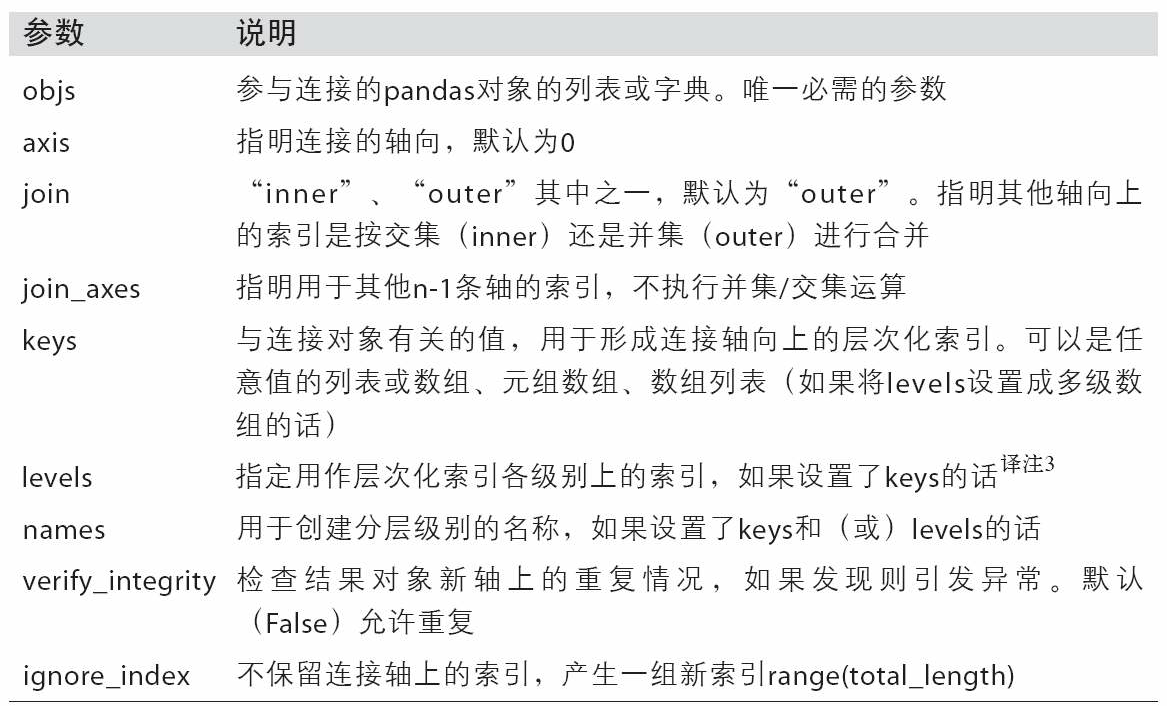
concat函数的参数

42f73737


合并重叠数据

  • NumPy的where函数,它表示⼀种等价于⾯向数组的if-else:
    np.where(pd.isnull(a), b, a):如果a是空,那么取nb.否则取a
  • Series有⼀个combine_first⽅法,实现的也是⼀样的功能,还带有pandas的数据对⻬:
    a.combine_first(b):用b的数据填补a的缺失值
  • 数据对齐功能:
    1. 会自动根据行索引来匹配填充数据
    2. 如果a没有的列,但是b有,那么这个列也会填充到返回的结果上
1
2
3
4
5
6
7
8
9
10
11
12
13
14
15
16
17
18
19
20
21
22
23
24
25
26
27
28
29
30
31
32
33
34
35
36
37
38
39
40
41
42
43
44
45
46
47
48
49
50
51
52
53
54
55
56
57
58
59
60
61
62
63
64
import pandas as pd
import numpy as np

a = pd.Series([np.nan, 2.5, np.nan, 3.5, 4.5, np.nan],
index=['f', 'e', 'd', 'c', 'b', 'a'])
b = pd.Series(np.arange(len(a), dtype=np.float64),
index=['f', 'e', 'd', 'c', 'b', 'a'])

b[-1] = np.nan
print(a)
# f NaN
# e 2.5
# d NaN
# c 3.5
# b 4.5
# a NaN
# dtype: float64

print(b)
# f 0.0
# e 1.0
# d 2.0
# c 3.0
# b 4.0
# a NaN
# dtype: float64

# 如果a是空,那么取nb.否则取a
print(np.where(pd.isnull(a), b, a))
# [0. 2.5 2. 3.5 4.5 nan]


# 用a的数据填补b的缺失值
print(b.combine_first(a))
# f 0.0
# e 1.0
# d 2.0
# c 3.0
# b 4.0
# a NaN
# dtype: float64


# 用b的数据填补a的缺失值
print(a.combine_first(b))
# f 0.0
# e 2.5
# d 2.0
# c 3.5
# b 4.5
# a NaN
# dtype: float64


# 如果b[:-2]没有的列,但是a[2:]有,那么a[2:]的列会填充到b[:-2]上
print(b[:-2].combine_first(a[2:]))
# a NaN
# b 4.5
# c 3.0
# d 2.0
# e 1.0
# f 0.0
# dtype: float64

8.3 重塑和轴向旋转

有许多⽤于重新排列表格型数据的基础运算。这些函数也称作重塑(reshape)或轴向旋转(pivot)运算。

重塑层次化索引

多级索引的两个主要功能:
(实际上就像是Excel中的一维表二维表的互转)

  • stack:
    将数据的列“旋转”为⾏。
    (一维表转为二维表)
  • unstack:
    将数据的⾏“旋转”为列。
    (二维表转为一维表)

参数:

  • level:
    默认情况下,stack和unstack操作的是最内层.(默认值-1)
    传⼊分层级别的编号或名称即可对其它级别进⾏stack和unstack操作:(level=1或level=’列名’)

    ==在对DataFrame进⾏unstack操作时,作为旋转轴的级别将会成为结果中的最低级别==

  • dropna:
    在转化过程中,可能会出现全部都是NaN的行,该参数设置这些行是否保留

1
2
3
4
5
6
7
8
9
10
11
12
13
14
15
16
17
18
19
20
21
22
23
24
25
26
27
28
29
30
31
32
33
34
35
36
37
38
39
40
41
42
43
44
45
46
47
48
49
50
51
52
53
54
55
56
57
58
59
60
import pandas as pd
import numpy as np


data = pd.DataFrame(np.arange(6).reshape((2, 3)),
index=pd.Index(['Ohio', 'Colorado'], name='state'),
columns=pd.Index(['one', 'two', 'three'],name='number'))

print(data)
# number one two three
# state
# Ohio 0 1 2
# Colorado 3 4 5


# 一维表转为二维表
# 默认情况下,stack操作的是最内层.
result = data.stack()
print(result)
# state number
# Ohio one 0
# two 1
# three 2
# Colorado one 3
# two 4
# three 5
# dtype: int32


# 二维表转为一维表
# # 默认情况下,unstack操作的是最内层.
print(result.unstack())
# number one two three
# state
# Ohio 0 1 2
# Colorado 3 4 5


print(result.unstack(level=0))
# state Ohio Colorado
# number
# one 0 3
# two 1 4
# three 2 5

print(result.unstack(level=1))
# number one two three
# state
# Ohio 0 1 2
# Colorado 3 4 5
# state Ohio Colorado


print(result.unstack(level='state'))
# state Ohio Colorado
# number
# one 0 3
# two 1 4
# three 2 5
1
2
3
4
5
6
7
8
9
10
11
12
13
14
15
16
17
18
19
20
21
22
23
24
25
26
27
28
29
30
31
32
33
34
35
36
37
38
39
40
41
42
43
44
45
46
47
48
49
import pandas as pd
import numpy as np


s1 = pd.Series([0, 1, 2, 3], index=['a', 'b', 'c', 'd'])
s2 = pd.Series([4, 5, 6], index=['c', 'd', 'e'])
data2 = pd.concat([s1, s2], keys=['one', 'two'])


print(data2)
# one a 0
# b 1
# c 2
# d 3
# two c 4
# d 5
# e 6
# dtype: int64


data3 = data2.unstack()
print(data3)
# a b c d e
# one 0.0 1.0 2.0 3.0 NaN
# two NaN NaN 4.0 5.0 6.0

print(data2.unstack().stack())
# one a 0.0
# b 1.0
# c 2.0
# d 3.0
# two c 4.0
# d 5.0
# e 6.0
# dtype: float64

print(data2.unstack().stack(dropna=False))
# one a 0.0
# b 1.0
# c 2.0
# d 3.0
# e NaN
# two a NaN
# b NaN
# c 4.0
# d 5.0
# e 6.0
# dtype: float64

在对DataFrame进⾏unstack操作时,作为旋转轴的级别将会成为结果中的最低级别

1
2
3
4
5
6
7
8
9
10
11
12
13
14
15
16
17
18
19
20
21
22
23
24
25
26
27
28
29
30
31
32
33
34
35
36
37
38
39
40
41
42
43
44
45
46
47
48
49
50
51
52
53
54
55
56
57
58
59
import pandas as pd
import numpy as np


data = pd.DataFrame(np.arange(6).reshape((2, 3)),
index=pd.Index(['Ohio', 'Colorado'], name='state'),
columns=pd.Index(['one', 'two', 'three'],name='number'))

print(data)
# number one two three
# state
# Ohio 0 1 2
# Colorado 3 4 5


# 一维表转为二维表
# 默认情况下,stack操作的是最内层.
result = data.stack()
print(result)
# state number
# Ohio one 0
# two 1
# three 2
# Colorado one 3
# two 4
# three 5
# dtype: int32

df = pd.DataFrame({'left': result, 'right': result + 5},
columns=pd.Index(['left', 'right'], name='side'))
print(df)
# side left right
# state number
# Ohio one 0 5
# two 1 6
# three 2 7
# Colorado one 3 8
# two 4 9
# three 5 10

# 在对DataFrame进⾏unstack操作时,作为旋转轴的级别将会成为结果中的最低级别
print(df.unstack('state'))
# side left right
# state Ohio Colorado Ohio Colorado
# number
# one 0 3 5 8
# two 1 4 6 9
# three 2 5 7 10


print(df.unstack('state').stack('side'))
# state Colorado Ohio
# number side
# one left 3 0
# right 8 5
# two left 4 1
# right 9 6
# three left 5 2
# right 10 7

将“⻓格式”旋转为“宽格式”(数据透视)

多个时间序列数据通常是以所谓的“⻓格式”(long)或“堆叠格式”(stacked)存储在数据库和CSV中的。

reindex说明:

1
2
3
4
5
6
7
8
9
10
11
12
13
14
15
16
17
18
19
20
21
22
23
24
25
26
27
28
29
30
31
32
33
34
35
36
37
38
39
40
41
42
43
44
45
46
47
48
49
50
51
52
53
54
55
56
57
58
59
60
61
62
63
64
65
66
67
68
69
70
71
72
73
74
75
76
77
78
79
80
81
82
83
84
85
86
87
88
89
90
91
92
93
94
95
96
97
98
99
100
101
102
103
104
105
106
107
108
109
110
111
112
113
114
115
116
117
118
119
120
121
122
123
124
125
126
127
128
129
130
131
132
133
134
135
136
137
138
139
140
141
142
143
144
145
146
147
148
149
150
151
152
153
154
155
156
157
158
159
160
161
162
import numpy as np
import pandas as pd
from pandas import Series, DataFrame

np.random.seed(666)

# series reindex
s1 = Series([1, 2, 3, 4], index=['A', 'B', 'C', 'D'])
print(s1)
'''
A 1
B 2
C 3
D 4
dtype: int64
'''


# 重新指定 index, 多出来的index,可以使用fill_value 填充
print(s1.reindex(index=['A', 'B', 'C', 'D', 'E'], fill_value = 10))
'''
A 1
B 2
C 3
D 4
E 10
dtype: int64
'''

s2 = Series(['A', 'B', 'C'], index = [1, 5, 10])
print(s2)
'''
1 A
5 B
10 C
dtype: object
'''

# 修改索引,
# 将s2的索引增加到15个
# 如果新增加的索引值不存在,默认为 Nan
print(s2.reindex(index=range(15)))
'''
0 NaN
1 A
2 NaN
3 NaN
4 NaN
5 B
6 NaN
7 NaN
8 NaN
9 NaN
10 C
11 NaN
12 NaN
13 NaN
14 NaN
dtype: object
'''

# ffill : foreaward fill 向前填充,
# 如果新增加索引的值不存在,那么按照前一个非nan的值填充进去
print(s2.reindex(index=range(15), method='ffill'))
'''
0 NaN
1 A
2 A
3 A
4 A
5 B
6 B
7 B
8 B
9 B
10 C
11 C
12 C
13 C
14 C
dtype: object
'''

# reindex dataframe
df1 = DataFrame(np.random.rand(25).reshape([5, 5]), index=['A', 'B', 'D', 'E', 'F'], columns=['c1', 'c2', 'c3', 'c4', 'c5'])
print(df1)
'''
c1 c2 c3 c4 c5
A 0.700437 0.844187 0.676514 0.727858 0.951458
B 0.012703 0.413588 0.048813 0.099929 0.508066
D 0.200248 0.744154 0.192892 0.700845 0.293228
E 0.774479 0.005109 0.112858 0.110954 0.247668
F 0.023236 0.727321 0.340035 0.197503 0.909180
'''

# 为 dataframe 添加一个新的索引
# 可以看到 自动 扩充为 nan
print(df1.reindex(index=['A', 'B', 'C', 'D', 'E', 'F']))
''' 自动填充为 nan
c1 c2 c3 c4 c5
A 0.700437 0.844187 0.676514 0.727858 0.951458
B 0.012703 0.413588 0.048813 0.099929 0.508066
C NaN NaN NaN NaN NaN
D 0.200248 0.744154 0.192892 0.700845 0.293228
E 0.774479 0.005109 0.112858 0.110954 0.247668
F 0.023236 0.727321 0.340035 0.197503 0.909180
'''

# 扩充列, 也是一样的
print(df1.reindex(columns=['c1', 'c2', 'c3', 'c4', 'c5', 'c6']))
'''
c1 c2 c3 c4 c5 c6
A 0.700437 0.844187 0.676514 0.727858 0.951458 NaN
B 0.012703 0.413588 0.048813 0.099929 0.508066 NaN
D 0.200248 0.744154 0.192892 0.700845 0.293228 NaN
E 0.774479 0.005109 0.112858 0.110954 0.247668 NaN
F 0.023236 0.727321 0.340035 0.197503 0.909180 NaN
'''

# 减小 index
print(s1.reindex(['A', 'B']))
''' 相当于一个切割效果
A 1
B 2
dtype: int64
'''

print(df1.reindex(index=['A', 'B']))
''' 同样是一个切片的效果
c1 c2 c3 c4 c5
A 0.601977 0.619927 0.251234 0.305101 0.491200
B 0.244261 0.734863 0.569936 0.889996 0.017936
'''

# 对于一个 serie 来说,可以使用 drop,来丢掉某些 index
print(s1.drop('A'))
''' 就只剩下 三个了
B 2
C 3
D 4
dtype: int64
'''

# dataframe drop(A) 直接去掉一行
print(df1.drop('A', axis=0))
''' axis 默认 是 行
c1 c2 c3 c4 c5
B 0.571883 0.254364 0.530883 0.295224 0.352663
D 0.858452 0.379495 0.593284 0.786078 0.949718
E 0.556276 0.643187 0.808664 0.289422 0.501041
F 0.737993 0.286072 0.332714 0.873371 0.421615
'''

print(df1.drop('c1', axis=1))
''' 将 c1 的列 去掉
c2 c3 c4 c5
A 0.326681 0.247832 0.601982 0.145905
B 0.373961 0.393819 0.439284 0.926706
D 0.558490 0.617851 0.461280 0.373102
E 0.030434 0.566498 0.383103 0.739243
F 0.982220 0.989826 0.957863 0.411514
'''

多个时间序列数据清洗成一列

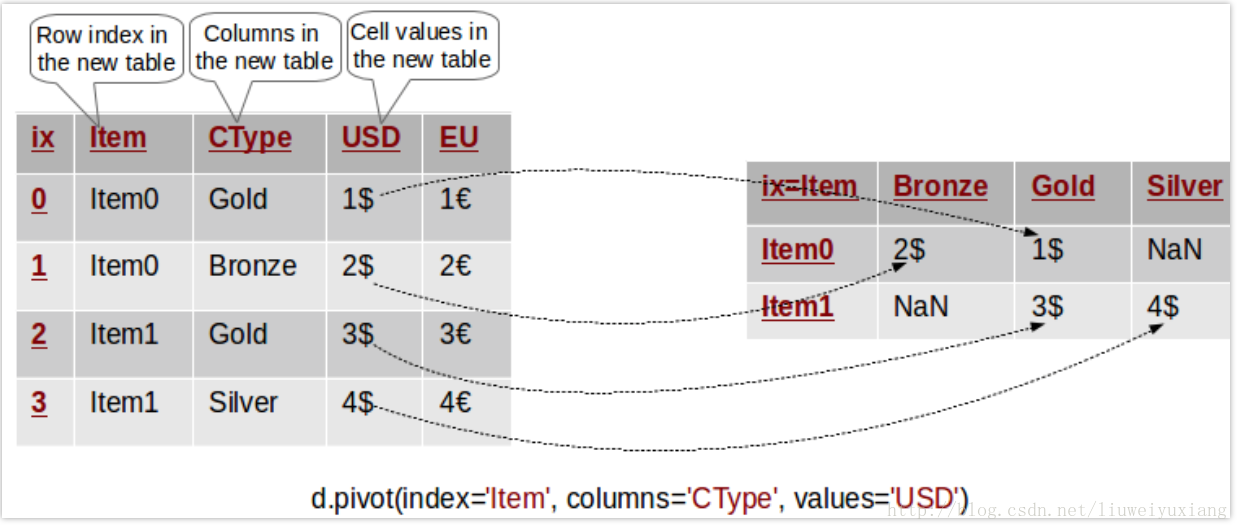
pivot:制作透视表,接受三个参数:

  • 行:用哪个字段作为行
  • 列:用哪个字段作为列
  • 值:用哪个字段作为单元格的值

img

1
2
3
4
5
6
7
8
9
10
11
12
13
14
15
16
17
18
19
20
21
22
23
24
25
26
27
28
29
30
31
32
33
34
35
36
37
38
39
40
41
42
43
44
45
46
47
48
49
50
51
52
53
54
55
56
57
58
59
60
61
62
63
64
65
66
67
68
69
70
71
72
73
74
75
76
77
78
79
80
81
82
83
84
85
86
87
88
89
90
91
92
93
94
95
96
97
98
99
100
101
102
103
104
105
106
107
108
109
110
111
112
113
114
115
116
117
118
119
120
121
122
123
124
125
import pandas as pd
import numpy as np


# examples/macrodata.csv的内容为:
# year,quarter,realgdp,realcons,realinv,realgovt,realdpi,cpi,m1,tbilrate,unemp,pop,infl,realint
# 1959.0,1.0,2710.349,1707.4,286.898,470.045,1886.9,28.98,139.7,2.82,5.8,177.146,0.0,0.0
# 1959.0,2.0,2778.801,1733.7,310.859,481.301,1919.7,29.15,141.7,3.08,5.1,177.83,2.34,0.74
# 1959.0,3.0,2775.488,1751.8,289.226,491.26,1916.4,29.35,140.5,3.82,5.3,178.657,2.74,1.09


data = pd.read_csv('examples/macrodata.csv')
print(data.head())
# year quarter realgdp realcons ... unemp pop infl realint
# 0 1959.0 1.0 2710.349 1707.4 ... 5.8 177.146 0.00 0.00
# 1 1959.0 2.0 2778.801 1733.7 ... 5.1 177.830 2.34 0.74
# 2 1959.0 3.0 2775.488 1751.8 ... 5.3 178.657 2.74 1.09
# 3 1959.0 4.0 2785.204 1753.7 ... 5.6 179.386 0.27 4.06
# 4 1960.0 1.0 2847.699 1770.5 ... 5.2 180.007 2.31 1.19
# [5 rows x 14 columns]


periods = pd.PeriodIndex(year=data.year, quarter=data.quarter,name='date')

print(periods)
# PeriodIndex(['1959Q1', '1959Q2', '1959Q3', '1959Q4', '1960Q1', '1960Q2',
# '1960Q3', '1960Q4', '1961Q1', '1961Q2',
# ...
# '2007Q2', '2007Q3', '2007Q4', '2008Q1', '2008Q2', '2008Q3',
# '2008Q4', '2009Q1', '2009Q2', '2009Q3'],
# dtype='period[Q-DEC]', name='date', length=203, freq='Q-DEC')


columns = pd.Index(['realgdp', 'infl', 'unemp'], name='item')
print(columns)
# Index(['realgdp', 'infl', 'unemp'], dtype='object', name='item')


data = data.reindex(columns=columns)
data.index = periods.to_timestamp('D', 'end')
print(data.index)
# DatetimeIndex(['1959-03-31', '1959-06-30', '1959-09-30', '1959-12-31',
# '1960-03-31', '1960-06-30', '1960-09-30', '1960-12-31',
# '1961-03-31', '1961-06-30',
# ...
# '2007-06-30', '2007-09-30', '2007-12-31', '2008-03-31',
# '2008-06-30', '2008-09-30', '2008-12-31', '2009-03-31',
# '2009-06-30', '2009-09-30'],
# dtype='datetime64[ns]', name='date', length=203, freq='Q-DEC')


# reset_index():重新索引,就是把将行索引变回RangeIndex.(原来行索引变成列,如果开启drop=True,那么将直接抛弃原行索引)
ldata = data.stack().reset_index().rename(columns={0: 'value'})
print(ldata)
# date item value
# 0 1959-03-31 realgdp 2710.349
# 1 1959-03-31 infl 0.000
# 2 1959-03-31 unemp 5.800
# ...
# 606 2009-09-30 realgdp 12990.341
# 607 2009-09-30 infl 3.560
# 608 2009-09-30 unemp 9.600
# [609 rows x 3 columns]


# pivot:制作透视表,行为date,列为item,值为value
pivoted = ldata.pivot(index='date',columns='item', values='value')
print(pivoted)
# item infl realgdp unemp
# date
# 1959-03-31 0.00 2710.349 5.8
# 1959-06-30 2.34 2778.801 5.1
# ...
# 2009-06-30 3.37 12901.504 9.2
# 2009-09-30 3.56 12990.341 9.6
# [203 rows x 3 columns]


np.random.seed(666)

ldata['value2'] = np.random.randn(len(ldata))
print(ldata[:5])
# date item value value2
# 0 1959-03-31 realgdp 2710.349 0.824188
# 1 1959-03-31 infl 0.000 0.479966
# 2 1959-03-31 unemp 5.800 1.173468
# 3 1959-06-30 realgdp 2778.801 0.909048
# 4 1959-06-30 infl 2.340 -0.571721


# 带有层次化的列 的透视表:
pivoted = ldata.pivot('date', 'item')
print(pivoted[:5])
value value2
# item infl realgdp unemp infl realgdp unemp
# date
# 1959-03-31 0.00 2710.349 5.8 0.479966 0.824188 1.173468
# 1959-06-30 2.34 2778.801 5.1 -0.571721 0.909048 -0.109497
# 1959-09-30 2.74 2775.488 5.3 -0.943761 0.019028 0.640573
# 1959-12-31 0.27 2785.204 5.6 0.608870 -0.786443 -0.931012
# 1960-03-31 2.31 2847.699 5.2 -0.736918 0.978222 -0.298733

print(pivoted['value'][:5])
# item infl realgdp unemp
# date
# 1959-03-31 0.00 2710.349 5.8
# 1959-06-30 2.34 2778.801 5.1
# 1959-09-30 2.74 2775.488 5.3
# 1959-12-31 0.27 2785.204 5.6
# 1960-03-31 2.31 2847.699 5.2


# 注意,pivot其实就是⽤set_index创建层次化索引,再⽤unstack重塑:
unstacked = ldata.set_index(['date', 'item']).unstack('item')
print(unstacked[:5])
# value value2
# item infl realgdp unemp infl realgdp unemp
# date
# 1959-03-31 0.00 2710.349 5.8 0.479966 0.824188 1.173468
# 1959-06-30 2.34 2778.801 5.1 -0.571721 0.909048 -0.109497
# 1959-09-30 2.74 2775.488 5.3 -0.943761 0.019028 0.640573
# 1959-12-31 0.27 2785.204 5.6 0.608870 -0.786443 -0.931012
# 1960-03-31 2.31 2847.699 5.2 -0.736918 0.978222 -0.298733

将“宽格式”旋转为“⻓格式”(逆透视)

旋转DataFrame的逆运算是pandas.melt。

它合并多个列成为⼀个,产⽣⼀个⽐输⼊⻓的DataFrame。

参数:
pandas.melt(frame, id_vars=None, value_vars=None, var_name=None, value_name='value', col_level=None)

  • frame:
    要处理的数据集。
  • id_vars:
    不需要被转换的列名。
  • value_vars:
    需要转换的列名,如果剩下的列全部都要转换,就不用写了。
  • var_name和value_name:
    是自定义设置对应的列名。
  • col_level :
    如果列是MultiIndex,则使用此级别。
1
2
3
4
5
6
7
8
9
10
11
12
13
14
15
16
17
18
19
20
21
22
23
24
25
26
27
28
29
30
31
32
33
34
35
36
37
38
39
40
41
42
43
44
45
46
47
48
49
50
51
52
53
54
55
56
57
58
59
60
61
62
63
64
65
66
67
68
69
70
71
72
73
74
75
76
77
78
79
80
81
82
83
84
85
86
import pandas as pd
import numpy as np


df = pd.DataFrame({'key': ['foo', 'bar', 'baz'],
'A': [1, 2, 3],
'B': [4, 5, 6],
'C': [7, 8, 9]})
print(df)
# key A B C
# 0 foo 1 4 7
# 1 bar 2 5 8
# 2 baz 3 6 9


# melt:逆透视
# id_vars:不需要转换的列
melted = pd.melt(df, id_vars=['key'])
print(melted)
# key variable value
# 0 foo A 1
# 1 bar A 2
# 2 baz A 3
# 3 foo B 4
# 4 bar B 5
# 5 baz B 6
# 6 foo C 7
# 7 bar C 8
# 8 baz C 9


# pivot:数据透视
reshaped = melted.pivot('key', 'variable', 'value')
print(reshaped)
# variable A B C
# key
# bar 2 5 8
# baz 3 6 9
# foo 1 4 7

# pivot数据透视其实也是一种创建索引的过程
# 所以可以使用set_index复原
print(reshaped.reset_index())
# variable key A B C
# 0 bar 2 5 8
# 1 baz 3 6 9
# 2 foo 1 4 7


# id_vars:不需要被转换的列名
# value_vars:需要转换的列名
print(pd.melt(df, id_vars=['key'], value_vars=['A', 'B']))
# key variable value
# 0 foo A 1
# 1 bar A 2
# 2 baz A 3
# 3 foo B 4
# 4 bar B 5
# 5 baz B 6


# value_vars:需要转换的列名
print(pd.melt(df, value_vars=['A', 'B', 'C']))
# variable value
# 0 A 1
# 1 A 2
# 2 A 3
# 3 B 4
# 4 B 5
# 5 B 6
# 6 C 7
# 7 C 8
# 8 C 9

# value_vars:需要转换的列名
print(pd.melt(df, value_vars=['key', 'A', 'B']))
# variable value
# 0 key foo
# 1 key bar
# 2 key baz
# 3 A 1
# 4 A 2
# 5 A 3
# 6 B 4
# 7 B 5
# 8 B 6