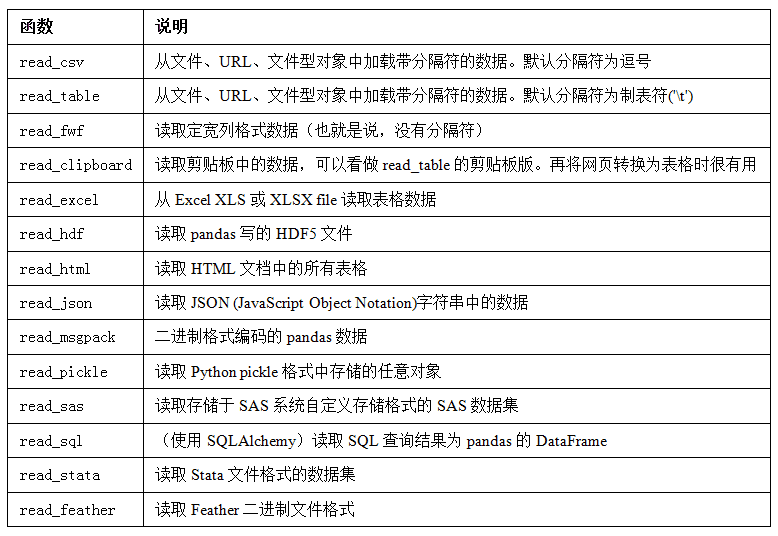
# 使用read_csv读取csv df = pd.read_csv('ex1.csv') print(df) # col1 col2 col3 col4 col5 # 0 a b c d hello # 1 e f g h world # 2 i j k l foo
# 使用read_table读取csv # 必须使用sep=',' df2 = pd.read_table('ex1.csv',sep=',') print(df2) # col1 col2 col3 col4 col5 # 0 a b c d hello # 1 e f g h world # 2 i j k l foo
# se2.csv没有标题行 print(pd.read_csv('ex2.csv')) # a b c d hello # 0 e f g h world # 1 i j k l foo
# 为其自动添加默认的列名 print(pd.read_csv('ex2.csv',header=None)) # 0 1 2 3 4 # 0 a b c d hello # 1 e f g h world # 2 i j k l foo
# 添加自定义列名 names = ('c1 c2 c3 c4 c5').split() print(pd.read_csv('ex2.csv',names=names)) # c1 c2 c3 c4 c5 # 0 a b c d hello # 1 e f g h world # 2 i j k l foo
# 具有0,1,2的行索引 names = ('c1 c2 c3 c4 c5').split() df1 = pd.read_csv('ex2.csv',names=names) print(df1) # c1 c2 c3 c4 c5 # 0 a b c d hello # 1 e f g h world # 2 i j k l foo
# 获取行标签为2的数据 print(df1.loc[2]) # c1 i # c2 j # c3 k # c4 l # c5 foo # Name: 2, dtype: object
print('------------------------')
# 列数量缺一 # 第一列变成了行索引 names = ('c1 c2 c3 c4').split() df2 = pd.read_csv('ex2.csv',names=names) print(df2) # c1 c2 c3 c4 # a b c d hello # e f g h world # i j k l foo
names = ('c1 c2 c3 c4 c5').split() df = pd.read_csv('ex2.csv', names=names) print(df) # c1 c2 c3 c4 c5 # 0 a b c d hello # 1 e f g h world # 2 i j k l foo
# 使用index_col将c5列的数据作为行标签 df = pd.read_csv('ex2.csv', names=names, index_col='c5') print(df) # c1 c2 c3 c4 # c5 # hello a b c d # world e f g h # foo i j k l
print(df.loc['hello']) # c1 a # c2 b # c3 c # c4 d # Name: hello, dtype: object
# 传入列表则形成多级索引 fd2 = pd.read_csv('ex2.csv',names=names, index_col=['c4', 'c5']) print(fd2) # c1 c2 c3 # c4 c5 # d hello a b c # h world e f g # l foo i j k
# 自动将NA和空字符串识别为pd的NaN对象 result = pd.read_csv('examples/ex5.csv') print(result) # something a b c d message # 0 one 1 2 3.0 4 NaN # 1 two 5 6 NaN 8 world # 2 three 9 10 11.0 12 foo
print(pd.isnull(result)) # something a b c d message # 0 False False False False False True # 1 False False False True False False # 2 False False False False False False
# na_values可以⽤⼀个列表或集合的字符串表示缺失值: result = pd.read_csv('examples/ex5.csv',na_values=['NULL']) print(result) # something a b c d message # 0 one 1 2 3.0 4 NaN # 1 two 5 6 NaN 8 world # 2 three 9 10 11.0 12 foo
# na_values:在这个list里面的的元素都会被认为是NaN # 这里one被视为NaN result = pd.read_csv('examples/ex5.csv',na_values=['one']) print(result) # something a b c d message # 0 NaN 1 2 3.0 4 NaN # 1 two 5 6 NaN 8 world # 2 three 9 10 11.0 12 foo
# 为不同的列分配不同的na_values sentinels = {'message': ['foo', 'NA'], 'something': ['two']} print(pd.read_csv('examples/ex5.csv', na_values=sentinels)) # something a b c d message # 0 one 1 2 3.0 4 NaN # 1 NaN 5 6 NaN 8 world # 2 three 9 10 11.0 12 NaN
# 要展示几行 pd.options.display.max_rows = 8 result = pd.read_csv('examples/ex6.csv') print(result) # one two three four key # 0 0.467976 -0.038649 -0.295344 -1.824726 L # 1 -0.358893 1.404453 0.704965 -0.200638 B # 2 -0.501840 0.659254 -0.421691 -0.057688 G # 3 0.204886 1.074134 1.388361 -0.982404 R # ... ... ... ... ... .. # 9996 -0.479893 -0.650419 0.745152 -0.646038 E # 9997 0.523331 0.787112 0.486066 1.093156 K # 9998 -0.362559 0.598894 -1.843201 0.887292 G # 9999 -0.096376 -1.012999 -0.657431 -0.573315 0 # [10000 rows x 5 columns]
# 只读3行 print(pd.read_csv('examples/ex6.csv', nrows=3)) # one two three four key # 0 0.467976 -0.038649 -0.295344 -1.824726 L # 1 -0.358893 1.404453 0.704965 -0.200638 B # 2 -0.501840 0.659254 -0.421691 -0.057688 G
# TextParser对象使你可以根据chunksize对⽂件进⾏逐块迭代 chunker = pd.read_csv('examples/ex6.csv', chunksize=1000) tot = pd.Series([]) for piece in chunker: # 给key列的计数 tot = tot.add(piece['key'].value_counts(), fill_value=0)
tot = tot.sort_values(ascending=False) print(tot[:6]) # E 368.0 # X 364.0 # L 346.0 # O 343.0 # Q 340.0 # M 338.0 # dtype: float64
data = pd.read_csv('examples/ex5.csv') print(data) # something a b c d message # 0 one 1 2 3.0 4 NaN # 1 two 5 6 NaN 8 world # 2 three 9 10 11.0 12 foo
print(tables) # [ Bank Name ... Updated Date # 0 Allied Bank ... November 17, 2016 # 1 The Woodbury Banking Company ... November 17, 2016 # 2 First CornerStone Bank ... September 6, 2016 # ... # 544 First Alliance Bank & Trust Co. ... February 18, 2003 # 545 National State Bank of Metropolis ... March 17, 2005 # 546 Bank of Honolulu ... March 17, 2005 # [547 rows x 7 columns]]
# 说明这个html中只有一个表格 print(len(tables)) # 1
failures = tables[0] # 读取前5条数据 print(failures.head()) # Bank Name ... Updated Date # 0 Allied Bank ... November 17, 2016 # 1 The Woodbury Banking Company ... November 17, 2016 # 2 First CornerStone Bank ... September 6, 2016 # 3 Trust Company Bank ... September 6, 2016 # 4 North Milwaukee State Bank ... June 16, 2016 # [5 rows x 7 columns]
<INDICATOR> <INDICATOR_SEQ>373889</INDICATOR_SEQ> <PARENT_SEQ></PARENT_SEQ> <AGENCY_NAME>Metro-North Railroad</AGENCY_NAME> <INDICATOR_NAME>Escalator Availability</INDICATOR_NAME> <DESCRIPTION>Percent of the time that escalators are operational systemwide. The availability rate is based on physical observations performed the morning of regular business days only. This is a new indicator the agency began reporting in 2009.</DESCRIPTION> <PERIOD_YEAR>2011</PERIOD_YEAR> <PERIOD_MONTH>12</PERIOD_MONTH> <CATEGORY>Service Indicators</CATEGORY> <FREQUENCY>M</FREQUENCY> <DESIRED_CHANGE>U</DESIRED_CHANGE> <INDICATOR_UNIT>%</INDICATOR_UNIT> <DECIMAL_PLACES>1</DECIMAL_PLACES> <YTD_TARGET>97.00</YTD_TARGET> <YTD_ACTUAL></YTD_ACTUAL> <MONTHLY_TARGET>97.00</MONTHLY_TARGET> <MONTHLY_ACTUAL></MONTHLY_ACTUAL> </INDICATOR>
使用lxml解析HTML代码:
1 2 3 4 5 6 7 8 9 10 11 12 13 14 15
from io import StringIO from lxml import objectify
tag = '<a href="http://www.google.com">Google</a>' # 使用lxml解析HTML代码 root = objectify.parse(StringIO(tag)).getroot()
from lxml import objectify import pandas as pd import numpy as np
path = 'datasets/mta_perf/Performance_MNR.xml'
withopen(path) as f: parsed = objectify.parse(f) root = parsed.getroot()
data = [] skip_fields = ['PARENT_SEQ', 'INDICATOR_SEQ', 'DESIRED_CHANGE', 'DECIMAL_PLACES']
# root.INDICATOR返回⼀个⽤于产⽣各个<INDICATOR>XML元素的⽣成器 for elt in root.INDICATOR: el_data = {} for child in elt.getchildren(): # 跳过某些字段 if child.tag in skip_fields: continue el_data[child.tag] = child.pyval data.append(el_data)
# 创建表 query = """ CREATE TABLE test (a VARCHAR(20), b VARCHAR(20), c REAL, d INTEGER ); """ # 连接数据库 con = sqlite3.connect('mydata.sqlite') con.execute(query) con.commit()
# 插入数据 data = [('Atlanta', 'Georgia', 1.25, 6), ('Tallahassee', 'Florida', 2.6, 3), ('Sacramento', 'California', 1.7, 5)] sql = "INSERT INTO test VALUES(?, ?, ?, ?)" con.executemany(sql, data) con.commit()
# 元组列表传给DataFrame构造器,创建DataFrame对象 # 列名就位于光标的description属性中 df = pd.DataFrame(rows, columns=[x[0] for x in cursor.description]) print(df) # a b c d # 0 Atlanta Georgia 1.25 6 # 1 Tallahassee Florida 2.60 3 # 2 Sacramento California 1.70 5
当然也有read_sql用于从SQLAlchemy连接读取数据。
1 2 3 4 5 6 7 8 9 10 11 12 13 14 15
import pandas as pd import sqlalchemy as sqla
db = sqla.create_engine('sqlite:///mydata.sqlite') df = pd.read_sql('select * from test', db)